
 Back
Back

When it comes to building apps, choosing the correct and intelligent technology is the key. React vs. React Native is a common debate for developers aiming to create dynamic as well as efficient apps. In this article, we will talk about the differences between the above two and help you decide which one is the best fit for your next project. React and React Native, both from Meta (formerly Facebook), are strong but actually serve different purposes. React is mainly used in building dynamic apps with reusable UI components and a virtual DOM for speedy updates.
On the other hand, what React Native does is make use of React’s ideas but concentrates on mobile app development. This enables developers to use a single codebase for cross-platform app development with a native appearance and feel. So, if you are looking for the technology to use for your next project, it is very important to start at the right foot. It is important to learn the pros and cons of each technology and then start on with the development part.
Understanding React
React, also called ReactJS, is a free JavaScript library used to make single-page applications. It’s very popular for building user interfaces (UI) for both websites and mobile apps. Facebook created and has supported React since 2011, and it has become very popular.
React helps developers make fast, flexible, and easy-to-use mobile and web applications. It also automates the design process, enabling developers to build whatever they envision without strict guidelines. ReactJS developers can easily integrate plugins or libraries with existing code, allowing them to develop fast, scalable, and straightforward web applications.
With Facebook’s React JavaScript package, web developers can now build lively and interactive websites. React lets developers create small, reusable pieces called components, which can be combined to make complex websites. This approach makes coding easier and faster because developers can reuse parts of their code.
The virtual DOM, a top feature of React, speeds up the app by updating only the changed parts of the user interface instead of the whole page. This makes the app faster and smoother. Also, React’s one-way data flow makes it easier to test and fix bugs.
React has many libraries and tools that enhance its features. React offers the flexibility and capacity to create cutting-edge, responsive online applications, regardless of the complexity of the application.
Challenges with React
Like any technology, React had some challenges when it started.
- Complexity: It was complex and hard for beginners to learn because there weren’t many learning resources.
- New Updates: New trends and ideas in React were coming up almost every day, making it hard to keep the documentation up-to-date. But now, things are better. Updates are announced well in advance, and there are helpful tools like Create React App.
Why Developers Love React
A well-liked technology for creating websites and apps is React. Because it allows them to design reusable elements, which expedites and simplifies their job, developers adore it. React also makes websites more visible in search results, increasing their visibility to a wider audience. It is adaptable to many tasks and integrates well with other tools.
Additionally, React boasts a large community with a wealth of resources, making it easy for developers to obtain support and answers. React is a favorite among developers because of all these characteristics.
Here are some key reasons why developers love React:
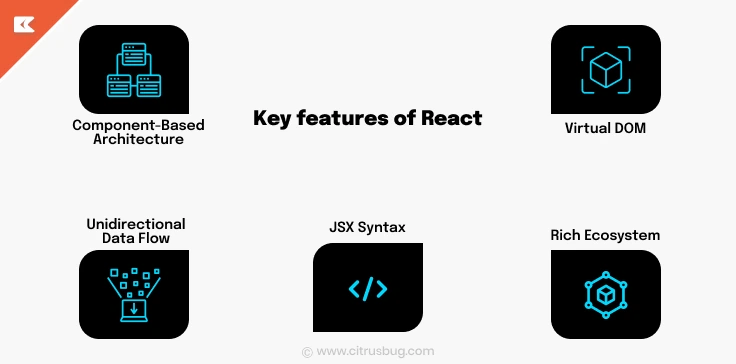
- Component-Based Architecture: React lets developers create small, self-contained pieces of an app that handle their own data. These pieces can be reused in different parts of the app, making the code easier to manage and update.
- Virtual DOM: React uses virtual DOM to speed up your application.Basically, instead of reloading the entire page, it only updates the parts that have changed. This helps the app run more smoothly and efficiently.
- Unidirectional Data Flow: React uses one-way data binding, which means data moves in just one direction. This makes it simpler to track and fix issues, and helps you understand the app’s state better.
- JSX Syntax: JSX is a JavaScript extension that helps to write code within JavaScript just like HTML. This makes the code easy to read and write.
- Rich Ecosystem: React has a large collection of libraries, tools, and a supportive community. This provides developers with many tools to make React more powerful and make development easier
Pros and Cons of React
| Pros | Cons |
|---|---|
| The virtual DOM batches DOM updates, making complex UIs noticeably fast. | React covers only the view layer; routing and state require separate libraries. |
| The component model encourages reusable, testable UI building blocks. | JSX mixes HTML and JavaScript, which steepens the learning curve for newcomers. |
| A vast ecosystem means solutions exist for nearly every common challenge. | Excessive flexibility leads large teams to produce architecturally inconsistent codebases. |
| Meta’s long-term backing ensures predictable releases and strong maintenance commitments. | Server-side rendering requires Next.js or a similar framework, adding real configuration overhead. |
| React Hooks simplified state and side-effect management without class component boilerplate. | Careless dependency choices inflate bundle size quickly. |
| One-way data flow makes state changes predictable and easier to debug end-to-end. | Rapid ecosystem churn means tutorials and library recommendations go stale fast. |
| Code splitting and lazy loading are first-class concerns in the React model. | Without conventions, two React codebases can look completely different and be hard to onboard. |
| High market demand means React engineers are widely available in most hiring markets. | Rendering bottlenecks appear in very large lists without explicit virtualization. |
| React components are easy to test in isolation with Jest and React Testing Library. | React cannot produce mobile apps; React Native is a separate tool for that. |
Diving into React Native
Hot reloading in React Native lets developers see their code changes right away without restarting the whole app. This makes them work faster and more efficiently.
React Native also has a strong collection of tools and plugins that let developers customize the framework and connect it with many other services. The strong community support and extensive documentation further simplify the learning curve and troubleshooting.
Where React renders to a browser DOM, React Native renders to native iOS and Android primitives. Facebook, Instagram, and Shopify use React Native development at production scale, driving significant tooling improvements over the past several years.
Key Features of React Native
React Native is popular for mobile app development because it has powerful features and makes the process easier. Here are some key points:
- Modular Architecture: The code can be divided into modules, making updates and collaboration easier.
- Rich Ecosystem and Libraries: There are many libraries and plugins available, so developers don’t have to build everything from scratch.
- Strong Community Support: A large, active community provides resources, tutorials, and support, helping with continuous improvement and innovation.
These features help developers create high-quality mobile apps that work well on different platforms.
Challenges with React Native
React Native also has some challenges. They are as follows:
- Missing Modules: It lacks some special modules for specific platforms, so you might need a native developer to create them.
- Navigation Issues: The navigation isn’t always smooth, which can affect user experience.
- Weak Animation Engine: The animation engine isn’t very powerful, making complex animations harder to achieve.
- Performance: Completely native apps may have better performance than extremely sophisticated ones.
Because it lets you use the same code for both iOS and Android, React Native is still a popular option for hybrid app development despite these drawbacks.
Pros and Cons of React Native
| Pros | Cons |
|---|---|
| A single JavaScript codebase targets iOS and Android, cutting development time significantly. | Some platform-specific UI behaviors still require separate code for iOS and Android. |
| React developers can transition to mobile with a manageable learning curve. | Third-party native modules introduce dependency conflicts that are hard to diagnose. |
| Hot reloading shows UI changes instantly without a full rebuild. | Debugging native modules requires Xcode and Android Studio knowledge on top of JavaScript. |
| The New Architecture (Fabric + JSI) eliminates the old bridge and brings performance close to native. | App binaries run larger than native builds due to the bundled JavaScript runtime. |
| Expo provides rapid prototyping and managed deployment workflows for teams new to mobile. | Complex animations require react-native-reanimated; the default animation API is basic. |
| Business logic, hooks, and utilities can be shared with an existing React web codebase. | Major React Native version upgrades have historically been painful due to breaking API changes. |
| Community plugins cover most native device features without writing native module code. | Custom hardware integrations like Bluetooth peripherals often still need fully native modules. |
| OTA updates via Expo EAS or CodePush let teams ship fixes without store review delays. | Deep React Native production experience is harder to hire for than senior React web engineers. |
| Performance is sufficient for the vast majority of consumer and enterprise app categories focused on app performance optimization. | GPU-intensive use cases like AR and games still favor native rendering pipelines. |
When to Choose React: Perfect for Web-Centric Projects
React is an excellent choice for projects that are primarily web-centric. Here are some scenarios where React shines:
React is great for various types of web projects. Here’s why:
- Single-Page Applications: React is great for apps that need to be fast and responsive. Its virtual DOM helps make updates quick and smooth.
- Dynamic Web Applications: React is good for projects with lots of user interactions and changing content. It makes managing complex user interfaces easier.
- Reusable Parts: With React, you can make parts of your app that you can use again and again. This makes it easier to take care of big apps.
- Better for Search Engines: React can run on the server, which helps your website show up better on search engines like Google.
- Works with Other Tools: React can work well with other tools and frameworks, making it flexible for different web development needs.
- Big Community: React has a large community with lots of resources, libraries, and tools to help you build your app faster and solve common problems.
- Using React for web projects gives you a strong, flexible, and efficient set of tools to build high-quality web applications.
When to Choose React Native: Ideal for Mobile-First Strategies
React Native is a powerful choice for projects that prioritize mobile experiences. Here are some scenarios where React Native excels:
- Cross-Platform Mobile Apps: It reduces development time and costs significantly. Did you know? React Native uses ideas from React to make mobile apps. It helps programmers create apps that work on both iOS and Android with the same code. This saves time and effort. One big advantage is that React Native gives apps a real native look and feel similar to native mobile apps. This leverages existing skills and reduces the learning curve.
- Consistent User Experience: React Native is great for projects that need to look and work the same on different platforms. It makes sure the design and features are uniform, which makes users happy. This consistency gives users a smooth and enjoyable experience, no matter what platform they use.
Choosing React Native for mobile-first strategies ensures that you can deliver high-quality, performant mobile applications efficiently, while also leveraging the benefits of a unified codebase and a strong developer community.
React vs React Native: When to Use Which?
Choosing between them comes down to target platform, team skills, and performance requirements.
- Building a web product? React is the only choice. React Native compiles to mobile UI primitives and cannot render HTML for browsers. React, often paired with Next.js, covers all web use cases.
- Shipping a cross-platform mobile app? React Native is the fit for building iOS and Android apps, especially if your team already knows React. Understanding cross-platform app development trade-offs will sharpen that choice.
- Need peak performance for games or graphics? Fully native Swift/Kotlin or a game engine is the answer. React Native’s New Architecture closes most standard gaps, but GPU-intensive rendering belongs in native code.
- Web and mobile from one JavaScript team? A monorepo using React for web and React Native for mobile, sharing business logic, splitting UI, avoids creating separate platform specialist squads.
Industry Uses of React and React Native
React dominates frontend development across industries, fintech trading dashboards, healthcare patient portals, SaaS control panels. Its predictability makes it the default for large teams building web products that iterate fast.
React Native commands a significant share of the mobile app development market, especially for startups that need iOS and Android coverage without separate native teams. Shopify, Walmart, and logistics operators run React Native in production. Flutter vs React Native is the most common debate teams have before committing to a cross-platform framework.
Companies that hire React Native developers find the talent pool smaller but cheaper than staffing separate iOS and Android squads, a trade-off worth making once a product has validated market fit.
Making the Right Choice for Your Project
The particular requirements and objectives of your project will choose which of React vs. React Native to use. A strong library for creating scalable web applications and dynamic web apps is called React. Because of its vast ecosystem and component-based architecture, it is perfect for web applications requiring great performance.
React Native is designed as a powerful mobile app framework for making mobile apps. It lets you create apps that work on both iOS and Android with one set of code, saving time and money. It’s perfect for projects where you need a great user experience on different devices.
The choice should ultimately be made in light of the needs of your project, the intended audience, and the availability of resources. React is your best option if you require a strong online presence. When it comes to building mobile applications, React Native provides the resources and adaptability you need to be successful.
By now, you must have gained a good understanding of React and React Native.
As far as these technologies go, their final product platforms differ, but their development processes are based on comparable ideas. Facebook introduced these frameworks, which are open-sourced and integrate seamlessly with JavaScript. Developers use all of these for surprisingly varied purposes.
It will actually be simpler to learn another framework if you can master either React or React Native. But you need to be familiar with React in order to create a React Native application. However, it doesn’t stop there! Since React Native offers little support for native applications,you must learn more about them in-depth.
Next Steps?
Consider collaborating with organizations that specialize in React development to achieve the greatest outcomes. These professionals can offer insightful advice and assist you in selecting the best technology for your needs. They can also help with every step of the development process, from initial design and planning to execution and continuing upkeep. You can make sure that your project is finished quickly and according to your high standards by making use of their knowledge.
Therefore, deciding between React vs. React Native depends on the particular requirements and objectives of your project, whether you’re creating a dynamic website or seamless mobile development solutions. You can choose a technology that will guarantee your project is finished effectively and to your satisfaction by being aware of its advantages and working with knowledgeable experts. Seek professional guidance to choose the best course of action and ensure the success of your project.
FAQs
Is React or React Native better for a startup?
Depends on platform. React suits web-first products; React Native is the faster path to iOS and Android with a smaller team and one shared codebase instead of two separate native builds.
Can I use React to build mobile apps?
No. React renders to a browser DOM only. To build iOS and Android apps with JavaScript, you need React Native, which is a separate framework that compiles directly to native mobile UI components.
Do I need to learn React before React Native?
Strongly recommended. React Native uses the same component model, JSX, and hooks. Developers with React experience find the transition to mobile considerably smoother than starting from scratch.
What is the main difference between React and React Native?
React renders to a browser DOM for web; React Native renders to native iOS and Android UI primitives. They share component architecture and JavaScript syntax but target completely different runtime environments.
How much does it cost to build with React vs React Native?
React costs less per sprint, larger talent pool, simpler toolchain. React Native costs more but is significantly cheaper than maintaining separate iOS and Android native codebases long-term.
Is React Native still relevant in 2026?
Yes. React Native is one of the two dominant cross-platform mobile frameworks alongside Flutter. Meta’s ongoing New Architecture investment and widespread enterprise adoption keep it well-maintained and a reliable long-term choice.