Explore our Healthcare Technology Offerings Citrusbug Healthcare → Citrusbug Healthcare →
Let’s Talk
AI Development

CRM Automation Solutions Built Around How You Sell

Every CRM eventually forces your team to work around it instead of through it. Citrusbug integrates automation that connects your CRM to the rest of your sales, marketing, and support stack, so workflows follow how your team actually sells, not how the platform assumes you do.

Hero Image

Impact in Numbers

12+ Years Industry Expertise

Operational Excellence

80+ Engineers

Tech Expertise

98% Client Retention

Consistent Commitment

4.7 / 5 Clutch Reviews

Based on 43 Reviews

Why Your CRM Automation Solutions Keep Falling Short

Reps spend roughly a third of a nine-to-five updating records instead of selling, and most sales teams still lose deals to slow, inconsistent follow-up rather than bad leads. Those are not staffing problems. They are automation gaps, and they show up the same way in every enterprise CRM: someone builds a workflow rule, it covers 70% of cases, and the remaining 30% get handled manually anyway because the rule can’t see what’s happening in the marketing platform or the support desk.

That’s the part most CRM automation projects miss. A workflow inside Salesforce or HubSpot is only as good as what it can see, and neither platform’s native automation looks past its own walls.

  • Sales reps losing hours a week to manual data entry and pipeline updates
  • Leads going cold because follow-up sequences don’t account for what marketing or support already knows
  • No single view of a customer across sales, marketing, and support systems
  • Revenue signals sitting in the CRM but never reaching the people who could act on them

Ready to See Where Your CRM Is Leaking Revenue?

A short audit shows exactly which workflows are worth automating and which ones need a custom layer.

Book a CRM Audit

What Enterprise CRM Automation Solutions Actually Replace

Intelligent Lead Routing and Scoring

Leads get scored and assigned the moment they hit the CRM, using behavioral, firmographic, and engagement signals instead of a static point system nobody updates after the first quarter.

Automated Pipeline and Deal Workflows

Stage progression, task creation, and time or behavior-triggered follow-ups run without a rep touching them, and stalled-deal alerts reach managers before a deal quietly dies in stage three.

Unified Customer Data Layer

One customer record updates in real time across sales, marketing, and support, with automated deduplication and validation so the “single view of the customer” claim is actually true.

Revenue Intelligence and Forecasting

Pipeline health, conversion patterns, and forecast accuracy get surfaced from live CRM data instead of a spreadsheet someone rebuilds every Monday, feeding straight into the same forecasting models sales ops already trusts.

Where CRM Automation Solutions Need a Custom Layer

Salesforce Agentforce and HubSpot Breeze have both moved past copilot suggestions into agents that qualify leads, draft outreach, and update records on their own. That’s real progress, and it’s usually the right first move if your team already lives inside one of those platforms.

Not a tooling problem. It’s a visibility problem. Agentforce can only act on what’s inside your Salesforce org. Breeze can only see what HubSpot holds. Neither one reaches into your billing system, your support desk, or a second CRM your acquired team still runs on. The moment a workflow needs to reason across systems, the native agent hits its wall.


When the Native Agent Layer Is Enough

  • Lead scoring within one CRM
  • Deal-stage nudges and reminders
  • Single-system follow-up sequences
  • Configure it well, and it works


When You Need a Custom Automation Layer

  • Cross-system triggers, like a support ticket that should pause a renewal sequence
  • Billing events that should update forecasts and revenue intelligence
  • Any workflow that has to write back to more than one system of record

Connecting CRM Automation Solutions to the Rest of Your Stack


Automation inside a CRM only fixes half the problem if the CRM still sits in a silo. Most enterprises we work with have customer data spread across the CRM, the ERP, a marketing platform, and a support tool, each with its own version of the truth, and automation built on top of that mess just automates the mess faster.

Fixing that means workflow automation across departments that treats the CRM as one node in a bigger data flow, not the center of it. We handle the sync logic, the conflict resolution, and the audit trail so a change in one system doesn't quietly overwrite a change in another.
CRM to ERP sync

Order status, invoicing, and fulfillment data flow into your ERP without manual re-entry on either side.

CRM to marketing sync

Campaign engagement and lead scores update bidirectionally so sales sees what marketing already knows.

CRM to support sync

Open tickets and CSAT history surface in the CRM record before a renewal conversation starts.

CRM to billing sync

Payment status and contract terms stay current without a finance team manually reconciling two systems

How We Roll Out CRM Automation Solutions

01

Discovery and Process Mapping

We map your actual sales process, not the one in the org chart. That includes every manual workaround reps have built because the CRM doesn't do what they need, since those workarounds are usually the clearest signal of what to automate first.

02

Automation and Agent Configuration

We build the workflows, scoring models, and sequences inside your CRM, and configure or extend native agent layers like Agentforce or Breeze where they already cover the use case well.

03

Integration and Data Unification

We connect the CRM to ERP, marketing, support, and billing systems, building the sync logic and conflict rules that keep one customer record accurate everywhere it appears.

04

hased Rollout and Rep Training

Automation rolls out to one team or pipeline segment first, with reps trained on what changed and why, before anything goes CRM-wide. This is where most vendor projects quietly fail, not at build time.

05

Post-Launch Tuning

We watch adoption and workflow performance for the first several weeks and adjust scoring rules, routing logic, and sequences based on what reps are actually doing, not what the spec assumed they'd do.

Our Case Studies

View All Case Studies →
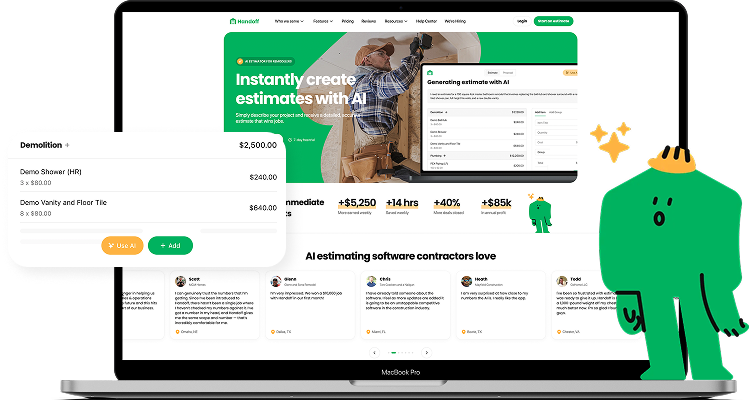
Handoff Smart Renovation Cost Estimator

Smart Renovation Cost Estimator

This AI tool provides real-time, accurate renovation cost estimates for homeowners, contractors, investors, and insurance companies.

View More
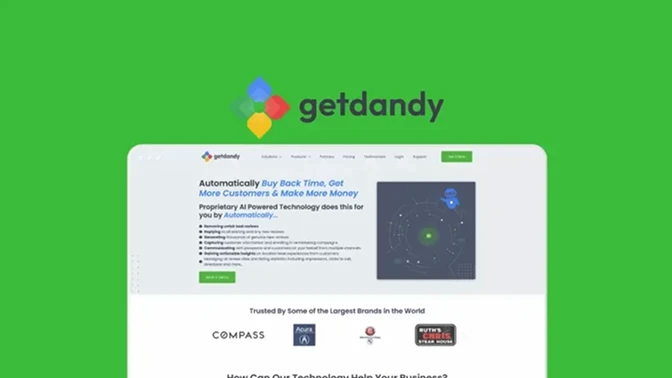
Getdandy Online Reputation Management Solution

Online Reputation Management Solution

It’s an AI-driven reputation management platform that automates online review collection, sentiment analysis, and response strategies to help businesses enhance their digital credibility.

View More
Bevel AI Health and Wellness Companion

AI Health and Wellness Companion

Bevel is a health intelligence platform that unifies wearable and lifestyle data to generate personalized metabolic and wellness insights.

View More

Why CRM Automation Actually Sticks

Workflows built around what reps already do, not a generic playbook they'll route around within a month.

Data cleanup happens before automation goes live, since automating bad data just moves the mess faster.

Rollout happens in phases, so a broken rule affects one team for a week, not your entire pipeline.

Reps see fewer screens and fewer manual steps, not a new dashboard added on top of the old ones.

What Waiting to Automate Actually Costs You

Every week a CRM stays half-automated, leads sitting in a queue get colder, deals stall in a stage nobody's watching, and reps quietly build their own spreadsheet workarounds that never sync back to the system of record. None of that shows up as a single incident. It shows up as a slow leak in pipeline conversion that's hard to trace back to any one cause, which is exactly why it tends to get deprioritized until a bad quarter forces the question.

Leads decaying in unmanaged queues Deals stalling with no manager visibility Forecasts drifting from actual pipeline reality Reps building shadow spreadsheets outside the CRM

CRM Automation Solutions Across Industries

Healthcare

Automates patient outreach, referral tracking, and intake follow-up while keeping data handling aligned with how a healthcare CRM software needs to run.

1

Fintech

Automates lead qualification, KYC-adjacent follow-up, and advisor handoffs across lending, wealth, and insurance workflows.

2

Real Estate

Automates lead-to-showing sequences, document handoffs, and renewal outreach, the same territory a real estate CRM software engagement covers.

3

Logistics

Automates account-based follow-up and renewal tracking for carriers and shippers managing high-volume, low-margin customer relationships.

4

EdTech

Automates enrollment follow-up, cohort progress tracking, and renewal outreach for platforms managing large, recurring student or learner relationships.

5

E-commerce

Automates post-purchase follow-up, win-back sequences, and loyalty outreach tied to real order and browsing data instead of a generic drip campaign.

6

Insurance

Automates policy renewal reminders, claims-status follow-up, and lead scoring across agents managing large, long-tail books of business.

7

Manufacturing

Automates quote follow-up, dealer and distributor communication, and account renewal tracking across long, multi-stakeholder sales cycles.

8

Ways to Start Automating Your CRM with Us

Automation Audit

A focused review of your current CRM workflows and data quality, with a prioritized automation roadmap.

  • Workflow and data audit
  • Prioritized roadmap
  • No build commitment
  • 2-3 week turnaround

Configure and Automate

Build and configure automation and native agent layers inside your existing CRM and connected systems.

  • Workflow and sequence build
  • Native agent configuration
  • Cross-system integration
  • Phased rollout support

Full CRM Rebuild

End-to-end CRM build or migration with automation and integrations designed in from the start.

  • Custom CRM architecture
  • Full data migration
  • Multi-system integration
  • Ongoing support options

How Much Does CRM Automation Cost?

Workflow automation inside an existing CRM typically ranges from $10,000 to $30,000, depending on how many systems and processes are involved. Tell us your setup, and we'll scope it honestly.


    Your data and info stays secure. Read our Privacy Policy.


    Client Testimonials (We're Rated 4.7 on Clutch)

    Why Teams Choose Citrusbug for CRM Automation Solutions

    Built Across Your Stack

    We design automation that reasons across CRM, ERP, marketing, and support systems instead of stopping at the edge of one platform’s native agent layer.

    Agent Governance Built In

    Every automated action and agent-driven update runs through Secure ADLC guardrails, so what an AI agent is allowed to touch is defined and auditable from day one.

    Senior Engineers

    You see who is actually building your automation layer before any work starts, not a generic team roster handed over after the contract is signed.

    Full CRM Ownership

    You own the source code, the automation logic, and the integration layer at delivery, with no vendor lock-in on the systems that run your pipeline.

    Daily Progress Visibility

    Regular demos and daily updates mean you see automation working on real data throughout the build, not just at a final handoff meeting.

    Rollout Reps Actually Use

    We measure success by adoption, not deployment, watching how reps use the automation in the first weeks and tuning it based on real behavior.

    Technologies and Platforms We Use

    LangChain
    Haystack
    OpenAI GPT-4
    Anthropic Claude
    OpenAI GPT-4
    Google Dialogflow
    Google Dialogflow
    RASA
    Rasa
    vapi
    Vapi.ai
    Microsoft Azure
    Azure Prompt flow
    DALL-E
    DALL-E
    Stable Diffusion
    Stable Diffusion
    tensorflow
    TensorFlow
    hugging face
    Hugging Face Transformers
    Amazon Glu
    Amazon Glu
    Pandas
    Pandas
    Numpy
    Numpy
    Redshift
    Redshift
    opencv
    OpenCV
    Tesseract OCR
    Tesseract OCR

    FAQs About CRM Automation Solutions

    Do you work inside our existing Salesforce or HubSpot instance, or only build from scratch?

    Both. We configure and extend automation inside your existing CRM, including native agent layers like Agentforce or Breeze, and build custom CRM systems when off-the-shelf platforms can't fit your workflow.

    How do you decide what stays in a native agent layer versus a custom automation layer?

    If a workflow only needs data inside one CRM, native agents usually cover it well. Anything that needs to read or write across systems typically needs a custom layer.

    What happens to our historical pipeline data during rollout?

    We audit, clean, and validate historical data before automation goes live, since automating on top of duplicate or stale records just moves the mess faster and undermines trust in the new system.

    How long before reps are actually using the new workflows?

    Workflow automation inside an existing CRM typically rolls out in 4 to 8 weeks. Full CRM builds with custom automation and integrations usually run 3 to 5 months depending on scope.

    Can this integrate with our ERP, marketing, and support tools without creating duplicate records?

    Yes. We build bidirectional sync layers with deduplication and validation rules so one customer record stays accurate across every connected system.

    How do you handle security and access control across automated workflows?

    Every automation and agent action runs through role-based access control, SSO, and encrypted data transmission, with compliance controls configurable for GDPR, CCPA, and industry-specific regulations.

    What does a typical CRM automation engagement cost?

    It depends on how many workflows, systems, and agent integrations are in scope. Costs typically range from $10,000 to $30,000, and more for more complex implementations. An automation audit gives you a scoped estimate before any build commitment.

    Do you provide support after automation goes live?

    Yes, including post-launch tuning based on real rep behavior, plus ongoing L1/L2/L3 support options if you want us managing the system long-term.

    Ready to Build CRM Automation Solutions That Actually Get Used?

    Partner with Citrusbug to automate your CRM, connect it to the rest of your stack, and put the right work in front of agents instead of reps.