

 Back
Back The No-Code/Low-Code Revolution: Transforming Enterprise Application Development


Executive Summary
Enterprise software development is changing faster than most people realize. Companies are struggling with a massive problem: they need more applications than their developers can possibly build. The average IT department has a backlog measured in years, not months. Meanwhile, business teams wait and wait, watching competitors move faster.
No-code and low-code platforms offer a way out of this bottleneck. These tools let people build applications using visual interfaces instead of typing thousands of lines of code. Think drag-and-drop instead of programming. The results can be dramatic: applications that would take 6 months to build traditionally can be ready in 4-6 weeks.
This white paper cuts through the hype to examine what these platforms really deliver, where they work well, and what challenges you'll face. We've analyzed market data, reviewed case studies, and talked to IT leaders who've implemented these tools successfully.
The Market Today
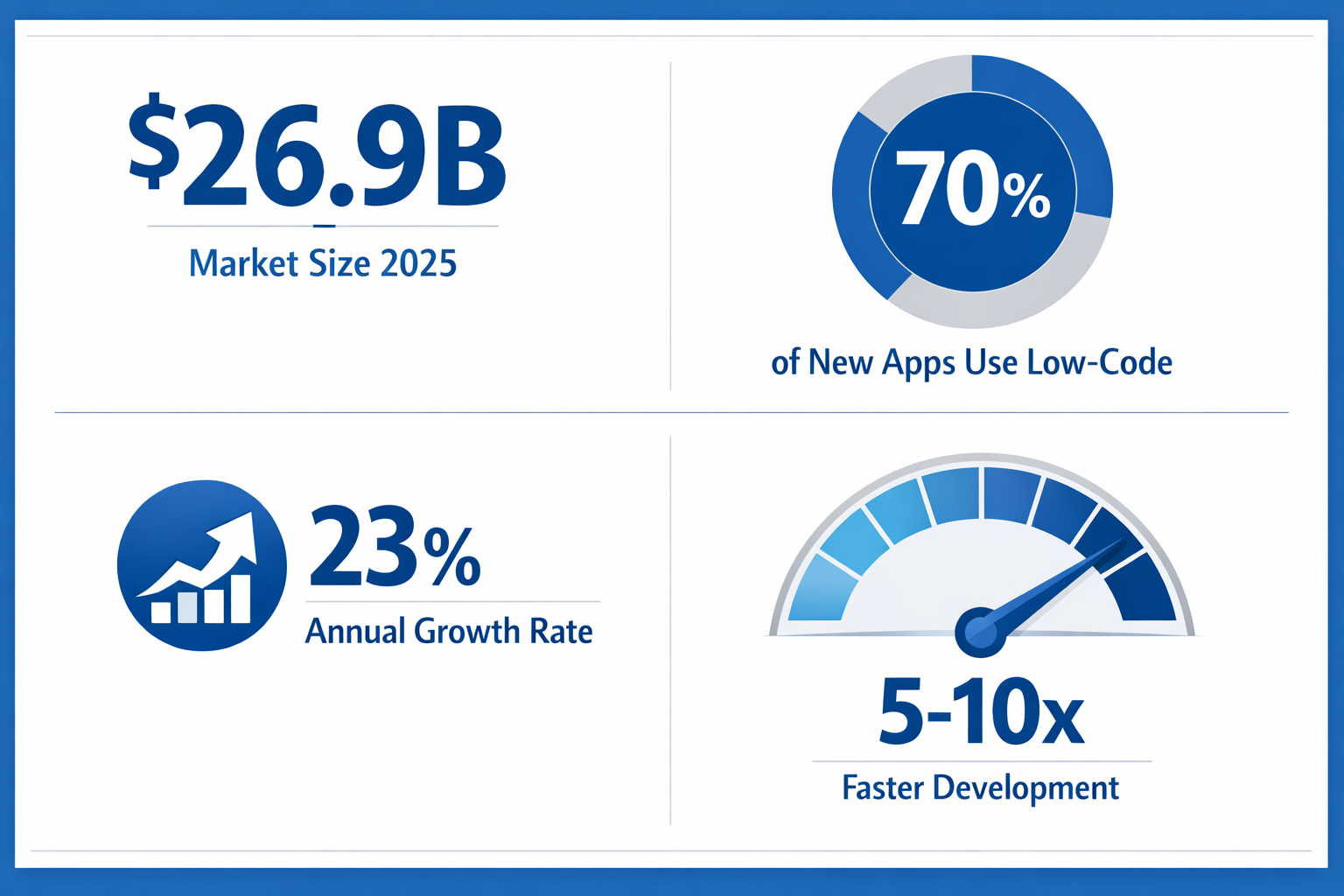
The numbers tell a clear story. The global market for these platforms hit $26.9 billion in 2025 and is growing at 23% annually. By 2030, analysts project it will reach nearly $74 billion.
More importantly, 70% of new enterprise applications now use some form of no-code or low-code technology. That's up from just 25% five years ago. This isn't a niche trend anymore. It's becoming the default way companies build software.
Three factors are driving this growth. First, there simply aren't enough developers. The shortage is projected to hit 4 million worldwide by 2025. Second, business moves too fast for traditional development cycles. Third, business users understand their problems better than developers can, but they've never had tools to build digital process automation solutions themselves.
What You Actually Get
Let's be specific about the benefits because the marketing materials can be misleading:
- Speed matters. Applications that took 6 months now take 6 weeks. We're not talking about simple forms. Companies are building customer portals, inventory systems, and enterprise workflow automation tools this fast.
- Costs drop significantly. Development expenses fall 50-90% because you need fewer specialized programmers and can reuse components. One Fortune 500 insurance company saved $12 million on a single project.
- Business users can build things. Marketing managers create campaign tools. HR specialists build onboarding systems. Operations people develop tracking dashboards. All without writing code.
- You can experiment cheaply. Want to test an idea? Build a prototype in a week and show it to users. If it works, scale it up. If not, you've only spent a week instead of months.
- IT teams focus on harder problems. Instead of building every form and workflow, developers can work on complex integrations, security, and performance optimization.
The Challenges Nobody Mentions
Here's what the vendors don't emphasize in their pitches:
- Governance is critical. When everyone can build applications, chaos follows without proper controls. You need standards, review processes, and security frameworks in place first.
- Not everything fits. Highly complex algorithms, applications needing extreme performance, or very specialized requirements might still need traditional coding.
- Security takes work. Business users don't think about SQL injection, authentication, or data encryption. You have to build those protections into your governance model.
- Vendor lock-in is real. Moving applications from one platform to another can be expensive and time-consuming. Choose carefully.
- Training is necessary. These tools are easier than coding, but they're not trivial. Plan for proper training programs, not just 'figure it out as you go.'
What We Recommend
Based on our research and analysis, successful implementation follows a pattern:
Start with governance. Create a Center of Excellence before you roll out platforms widely. Define who can build what, how applications get reviewed, and what security requirements apply. This seems like overhead, but it prevents major problems later.
Run pilots first. Pick 2-3 projects that matter to the business but won't cause disasters if something goes wrong. Target applications you can deliver in 4-8 weeks. Measure everything: speed, cost, quality, user satisfaction.
Invest in training. Budget time and money for proper education. The best platforms won't help if people don't know how to use them effectively.
Think hybrid. Use no-code/low-code for what it's good at: standard business applications, workflows, portals, dashboards. Use traditional development for complex algorithms, system software, and specialized requirements.
Measure and communicate. Track development speed, costs, and business outcomes. Share successes. Build momentum through visible wins.
The rest of this white paper dives deep into each of these areas. You'll find market analysis, technical details, real-world examples, implementation strategies, and practical advice for making this work in your organization.
1. Introduction
Software development has always been hard. You need specialized skills, years of training, and expensive tools. More importantly, you need time. Building even a simple application traditionally takes months of requirements gathering, design, coding, testing, and deployment.
This model worked when businesses needed a handful of applications that changed slowly. But that world is gone. Modern companies need hundreds of applications that evolve constantly. Customer expectations shift overnight. Competitors launch new capabilities weekly. Regulations change. Markets transform.
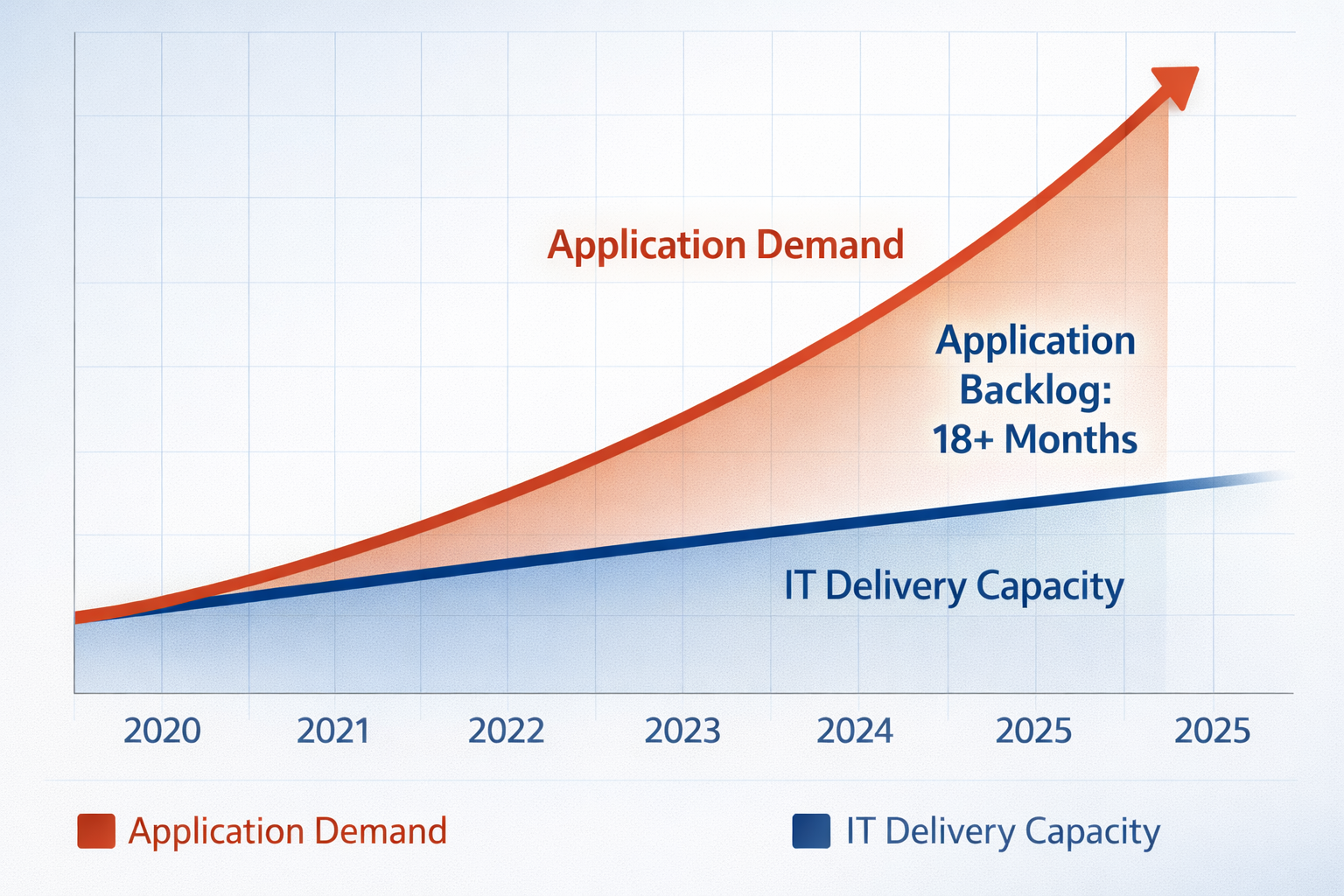
Meanwhile, IT departments drown in requests. The average enterprise has an application backlog measured in years. Business teams submit requests and wait 12-18 months for delivery, if they get anything at all. By then, the original problem has usually changed or been solved some other way.
No-code and low-code platforms attack this problem from a different angle. Instead of trying to hire more programmers (who don't exist in sufficient numbers), these tools make application development accessible to people who don't code. They replace programming languages with visual interfaces, provide pre-built components instead of starting from scratch, and automate the complex technical details that traditionally required specialists.
1.1 The Digital Transformation Pressure
Every company is now a software company, whether they like it or not. Retail companies build e-commerce platforms. Manufacturers develop IoT systems. Banks create mobile apps. Healthcare providers deploy patient portals. Even restaurants need online ordering systems.
The COVID-19 pandemic accelerated this trend dramatically. Companies that took years to digitize found themselves forced to do it in weeks. Remote work became mandatory overnight. Digital customer engagement went from nice-to-have to essential. Organizations that could quickly build and deploy new applications survived. Those that couldn't struggled or failed.
The pace hasn't slowed since then. If anything, expectations have increased. Customers now expect seamless digital experiences everywhere. Employees want modern tools that work as well as consumer apps. Business leaders demand data-driven insights in real-time.
Traditional development can't keep up. A McKinsey survey found that 78% of business leaders say their company's ability to respond to market changes is limited by IT capacity. The math is simple: unlimited demand for applications, severely limited supply of people who can build them.
1.2 Defining No-Code and Low-Code
Let's clarify what we mean by these terms because they get used loosely:
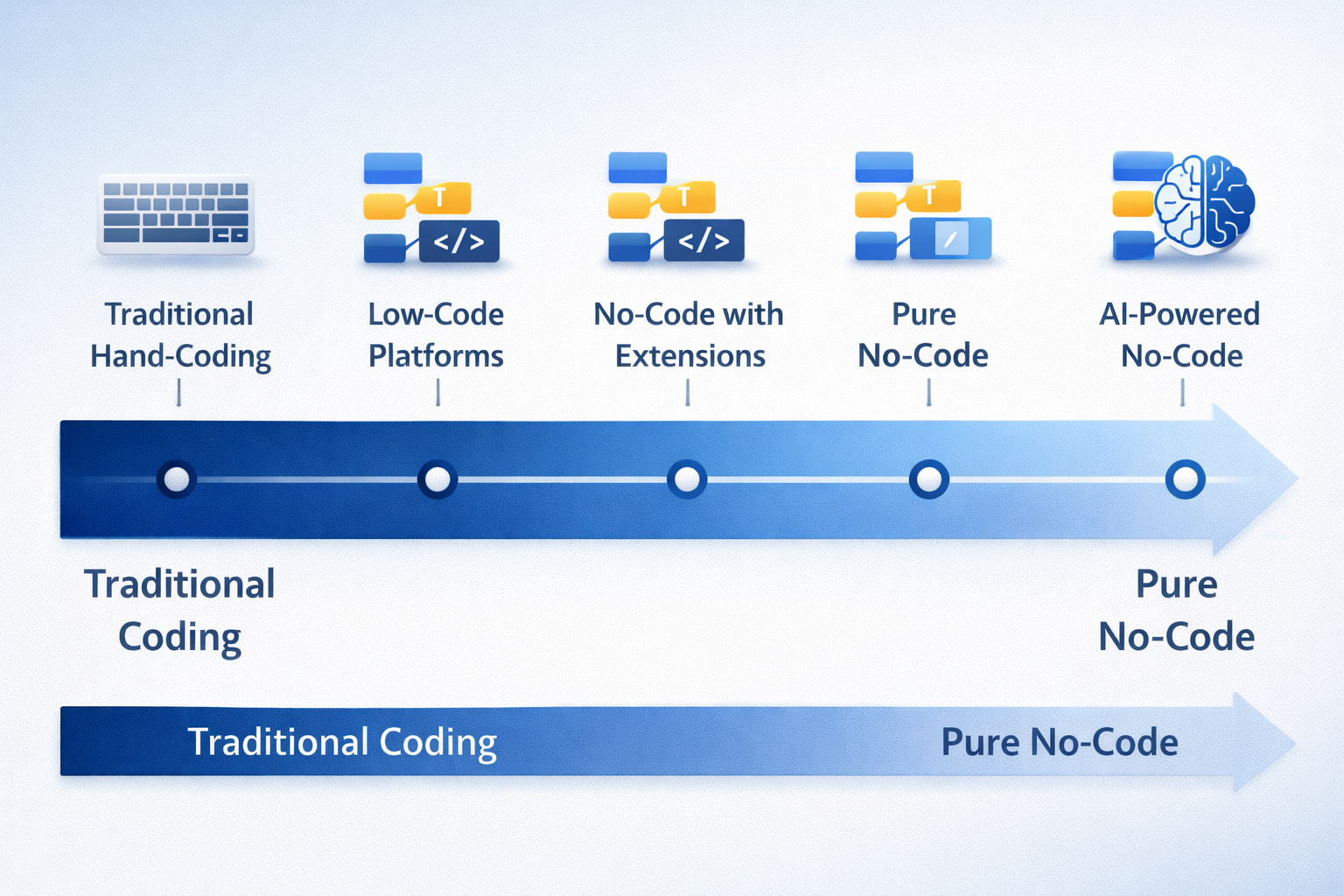
No-code platforms are designed for people with zero programming experience. You build applications entirely through visual interfaces. Drag components onto a canvas. Fill out forms. Click buttons. The platform generates all the code behind the scenes.
Examples include Airtable for databases, Webflow for websites, Zapier for workflow automation, and Bubble for web applications. These platforms target business users who need to build departmental tools, simple customer-facing applications, or workflow automation.
The big advantage is accessibility. Anyone with basic computer skills can learn to use these tools. A marketing manager can build a campaign tracking system. An HR specialist can create an onboarding workflow. A sales operations person can develop territory management tools. No programming required.
Low-code platforms provide visual development tools but also let you write custom code when needed. You get the productivity benefits of visual development for standard features, plus the flexibility to handle unique requirements through programming.
Examples include OutSystems, Mendix, Microsoft Power Platform, and Salesforce Lightning. These platforms target professional developers who want to move faster and business analysts who need more power than pure no-code provides.
Low-code platforms typically offer more sophisticated capabilities: complex data models, enterprise system integration, advanced security features, and the ability to scale to millions of users. They're built for serious business applications, not just departmental tools.
The spectrum matters. This isn't a binary choice. No-code and low-code exist on a continuum from purely visual to mostly code-based. Many platforms blur the lines, offering no-code interfaces for simple scenarios and low-code capabilities for complex requirements.
Smart companies use platform portfolios: no-code for quick departmental applications, low-code for enterprise systems, and traditional development for specialized requirements. Each approach has its place.
1.3 What This White Paper Covers
We designed this white paper for technology and business leaders evaluating or implementing no-code/low-code initiatives. Here's what you'll find:
- Market landscape and trends. Where the industry is today, who the major players are, and where things are heading.
- Technical capabilities. What these platforms can actually do, explained without the marketing spin.
- Business value. Quantified benefits, ROI analysis, and real-world results from companies that have implemented these tools.
- Use cases and examples. Specific applications across industries and functions, with details on what works well.
- Challenges and limitations. The problems vendors don't mention, explained honestly.
- Governance and best practices. How to implement these platforms without creating security disasters or chaos.
- Implementation strategy. Step-by-step guidance based on what's worked for other organizations.
- Future trends. Where the technology is headed and what that means for your strategy.
Our research draws from industry analyst reports (Gartner, Forrester, IDC), academic studies, vendor documentation, and interviews with IT leaders at Fortune 500 companies. We cite specific sources throughout and provide full references at the end.
2. The Evolution of Application Development
To understand why no-code/low-code platforms matter, you need to understand what came before and why it wasn't working.
2.1 Traditional Development: Slow and Expensive
For decades, building software meant hand-coding every feature. Developers would gather requirements, design systems, write thousands of lines of code, test everything, fix bugs, and finally deploy. This process took months or years for significant applications.
The waterfall methodology made this even slower. You had to define all requirements upfront, design the complete system, and then build it sequentially. No going back. If requirements changed halfway through (which they always did), you either ignored the changes or restarted parts of the project.
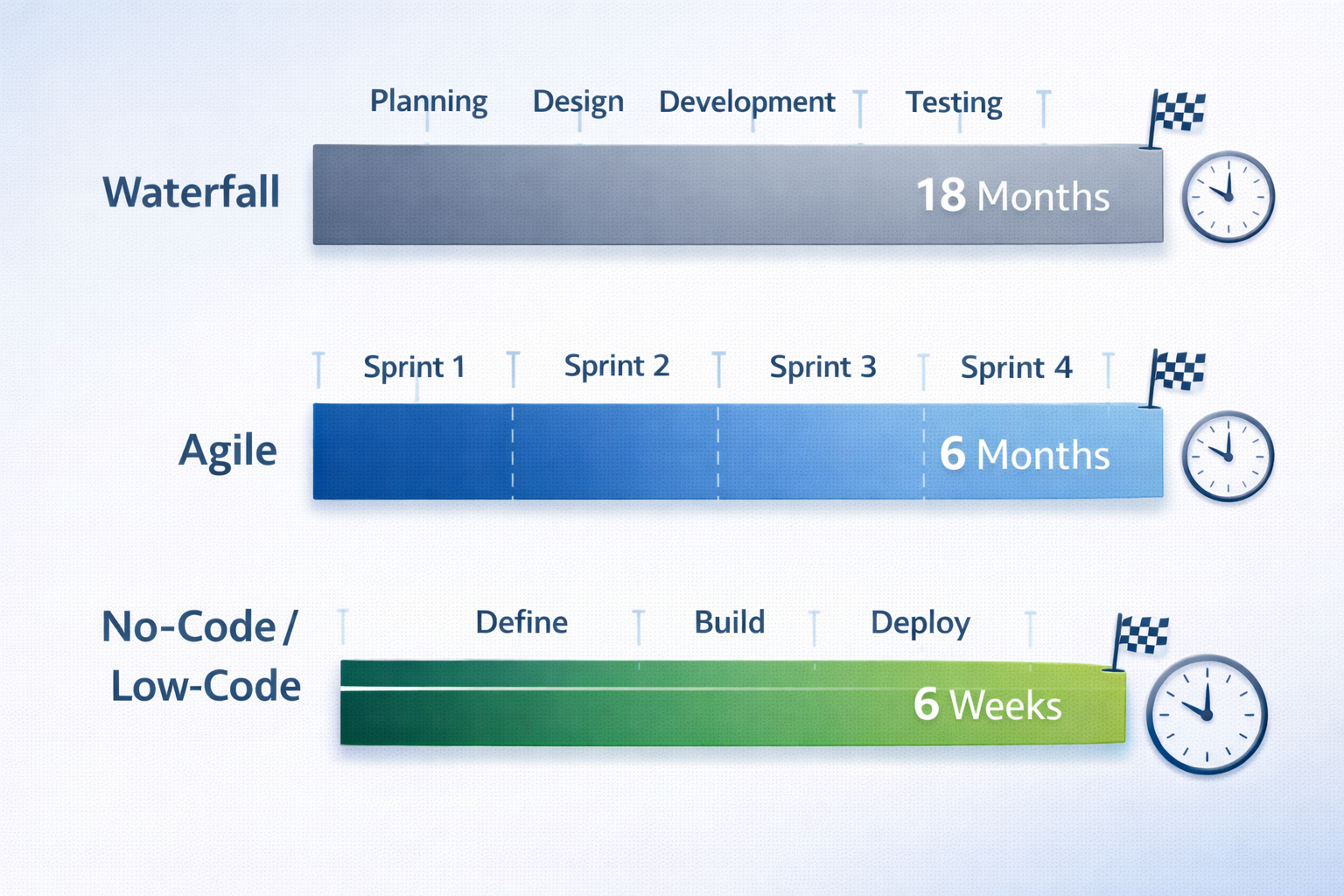
A typical enterprise application took 12-18 months to deliver. By the time it launched, business conditions had often changed. The solution addressed yesterday's problem, not today's reality.
Agile methodologies and rapid application development approaches improved things. Instead of building everything at once, teams deliver working software every few weeks. They gather feedback, adjust plans, and iterate. This cuts delivery time from 12-18 months down to 3-6 months for comparable applications.
But even agile development has limits. Every feature still requires hand-coding by skilled programmers. Testing and debugging remain time-consuming. The gap between what business people need and what developers can deliver persists. Most importantly, you still need those scarce, expensive developers for everything.
2.2 Early Attempts at Visual Development
The idea of building applications visually isn't new. Attempts date back decades:
In the 1980s, fourth-generation programming languages (4GLs) like Oracle Forms and PowerBuilder let developers define what they wanted instead of specifying every detail. These tools generated code automatically from high-level specifications. They made developers 3-5 times more productive.
But 4GLs were still developer tools. You needed programming knowledge to use them. They worked well for database applications but struggled with other types of software.
The 1990s brought rapid application development (RAD) tools like Microsoft Access and FileMaker. Power users could build database applications without extensive coding. These tools proved that visual development could work for broader audiences.
However, RAD tools had limitations. They didn't scale well to enterprise needs. Web and mobile support was weak or nonexistent. Integration with other systems was difficult. They worked great for departmental databases but couldn't handle complex enterprise applications.
Model-driven development in the 2000s took another approach. Developers created visual models of their systems, then generated complete applications from those models. Early low-code platforms like OutSystems and Mendix emerged from this movement.
These platforms proved that visual development could scale to real enterprise applications when combined with cloud infrastructure, modern architecture, and proper integration capabilities.
2.3 The Modern No-Code/Low-Code Movement
The current generation of platforms emerged in the mid-2010s, enabled by several technology advances:
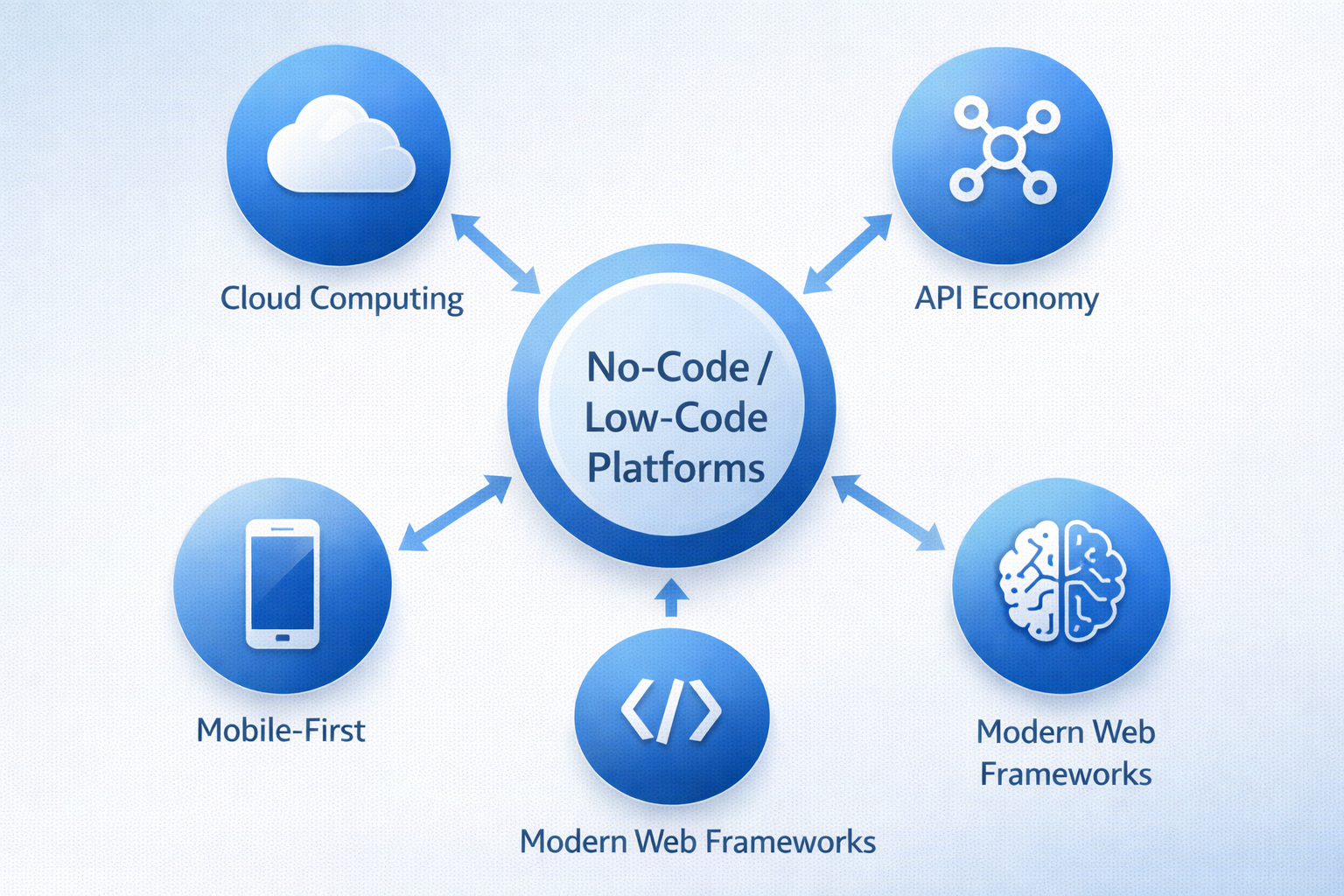
Cloud computing eliminated infrastructure headaches and accelerated cloud-native application development. Platforms could provide instant development environments without requiring companies to buy servers or configure networks. Automatic scaling meant applications could grow from 10 users to 10 million without manual intervention.
APIs everywhere made integration possible. Modern systems expose APIs that let platforms connect to anything: databases, SaaS applications, legacy systems, IoT devices. You can build applications that pull data from 20 different sources without writing integration code.
Mobile technology created demand for multi-platform applications. Companies needed apps that worked on phones, tablets, desktops, and web browsers. Traditional development meant building separate versions for each platform. No-code/low-code platforms generate apps for all platforms from a single definition.
Artificial intelligence is now driving AI-powered app development and making platforms even smarter. AI-powered features suggest components based on what you're building, generate code from natural language descriptions, automatically create tests, and identify potential bugs before deployment.
Business pressures accelerated adoption. The pandemic forced rapid digitization. The developer shortage made traditional hiring impossible. Customer expectations increased. Competitive pressures intensified. Companies needed applications fast, and traditional development couldn't deliver.
The market responded with waves of new platforms. First came specialized tools for specific needs: workflow automation, website building, database applications. Then enterprise-grade platforms capable of building sophisticated business applications. Now we're seeing AI-powered platforms and industry-specific solutions.
By 2024, the market hit a tipping point. No-code/low-code moved from experimental to mainstream. Major analyst firms like Gartner created dedicated research categories. Tech giants like Microsoft, Salesforce, and Google made billion-dollar platform investments. The question changed from 'Should we consider this?' to 'How should we implement it?'
3. Market Landscape and Trends
The no-code/low-code market has exploded. Understanding the current state, major players, and trends helps you make informed platform decisions.
3.1 Market Size and Growth
Let's start with numbers from Gartner's latest research:
| Year | Market Size | Growth Rate |
|---|---|---|
| 2023 | $17.8 billion | 25.1% |
| 2024 | $21.8 billion | 22.5% |
| 2025 | $26.9 billion | 23.2% |
| 2030 (projected) | $73.8 billion | 22.4% CAGR |
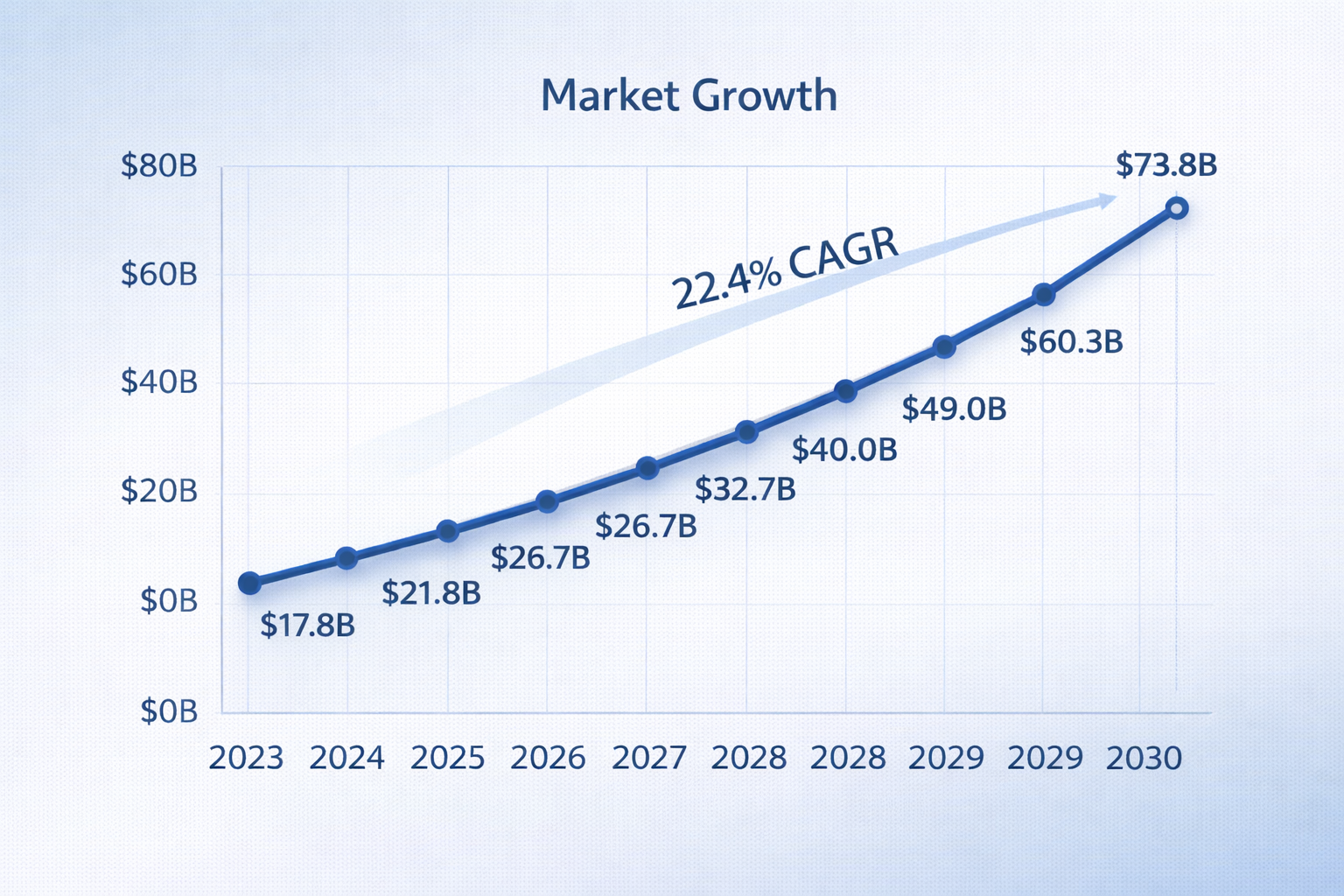
This growth rate is nearly double the overall enterprise software market (11% CAGR). The gap reflects a fundamental mismatch: traditional development can't scale fast enough to meet demand.
More telling than revenue is adoption rate. Gartner reports that 70% of new enterprise applications in 2025 use no-code or low-code platforms. That's up from just 25% in 2020. This isn't a niche trend anymore. It's become the default approach.
Geography matters. North America leads with 45% market share ($12.1 billion), driven by high cloud adoption and technology sophistication. Europe follows at 28% ($7.5 billion). But Asia-Pacific is growing fastest at 31% annually, particularly in China, India, and Southeast Asia as digital transformation accelerates.
Industry adoption varies significantly:
| Industry | Adoption Rate |
|---|---|
| Financial Services | 78% |
| Healthcare | 71% |
| Retail & Consumer Goods | 68% |
| Manufacturing | 64% |
| Public Sector | 59% |
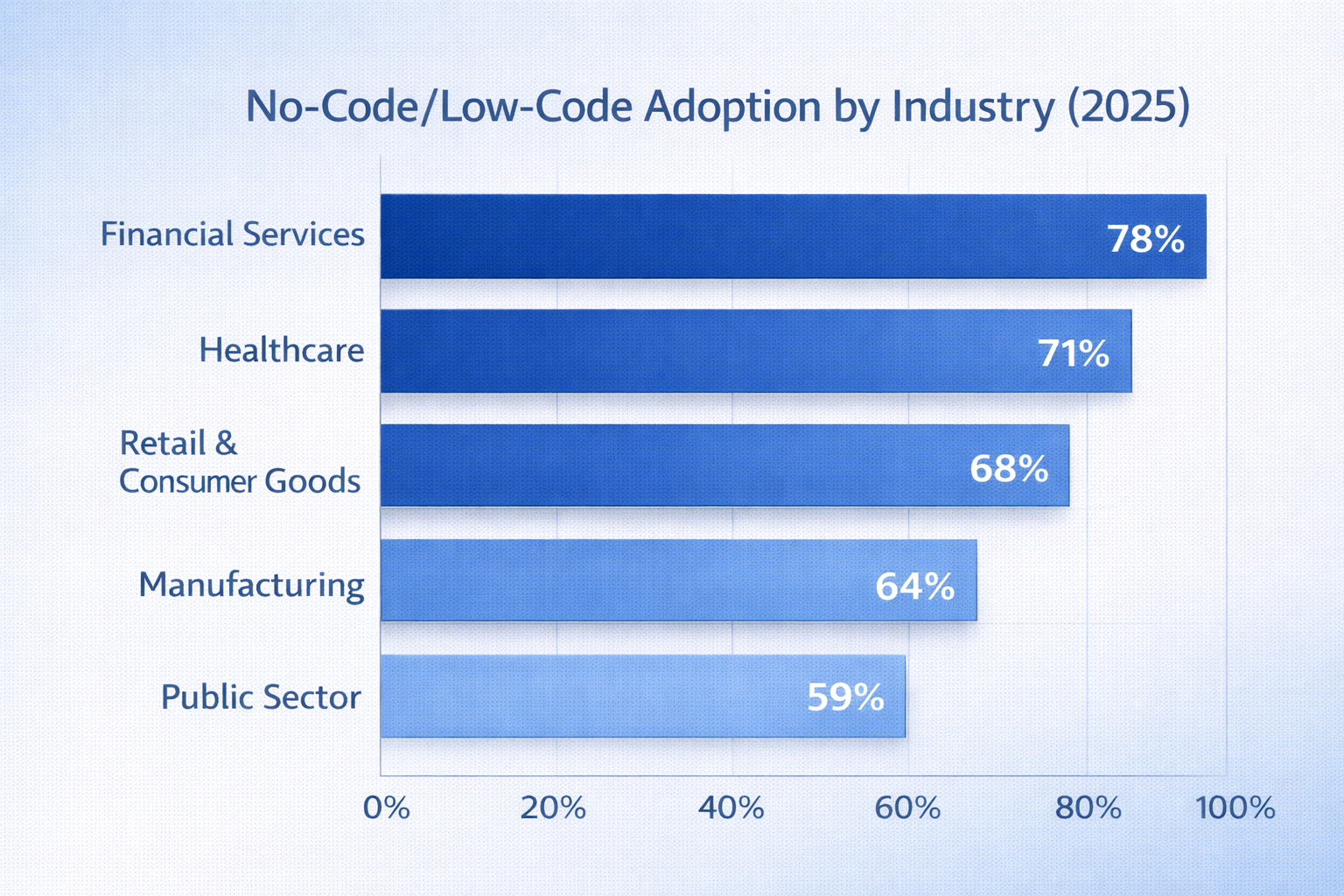
Financial services leads because of intense pressure to innovate while maintaining compliance. Healthcare surged during the pandemic as organizations rapidly built telehealth and patient engagement tools. Retail adoption grew as companies scrambled to build e-commerce and omnichannel experiences.
3.2 Major Platform Categories
The market isn't monolithic. Different platforms serve different needs:
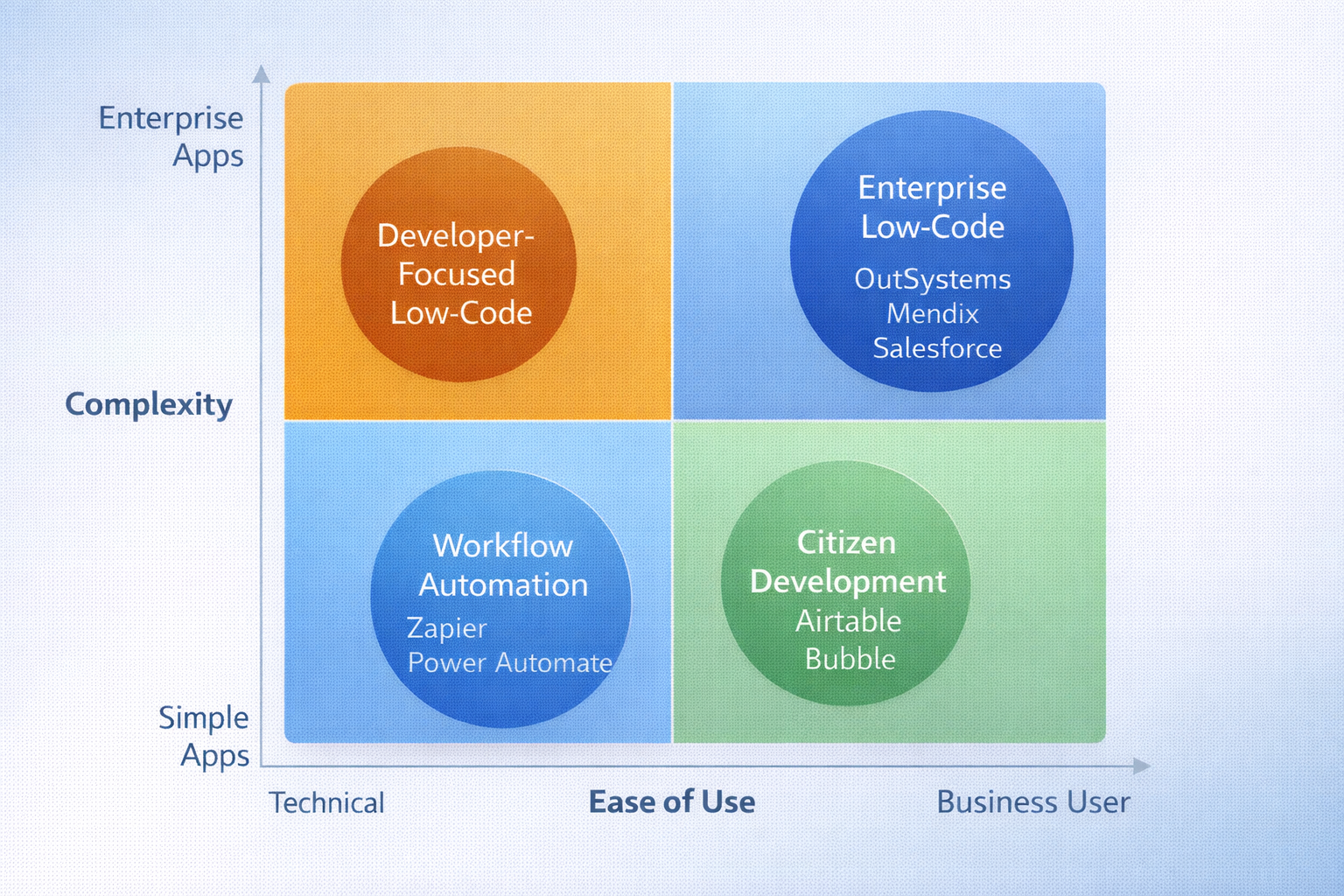
Enterprise Low-Code Platforms target professional developers building mission-critical applications. Microsoft Power Platform leads this segment with 10+ million monthly users. Salesforce Lightning dominates for CRM-related applications. OutSystems and Mendix serve financial services and large enterprises needing sophisticated capabilities.
These platforms offer comprehensive features: complex data modeling, enterprise integrations, advanced security, DevOps tools, and the ability to build scalable enterprise applications for millions of users. They're designed for serious business applications, not toy projects.
Citizen Development Platforms make building applications accessible to business users. Airtable pioneered the spreadsheet-database hybrid with 300,000+ organizations. Bubble enables entrepreneurs to build web applications without coding. These platforms prioritize ease of use over advanced capabilities.
The sweet spot is departmental applications and simple customer-facing tools. Marketing teams build campaign managers. Operations teams create tracking systems. Small businesses build custom tools without hiring developers.
Workflow Automation platforms connect applications and support business process automation for repetitive tasks. Zapier leads with 5,000+ application connections and 2 million+ users. Microsoft Power Automate integrates deeply with Office 365 and Azure. These tools let business users automate tasks that previously required custom coding or manual work.
Common use cases include data synchronization between systems, approval workflows, notification routing, scheduled tasks, and form processing. The ROI is immediate: tasks that took hours manually now happen automatically.
Specialized Platforms target specific use cases. Webflow revolutionized web design with visual development that generates production-ready code. Shopify enables e-commerce without custom development. Industry-specific platforms provide pre-built components for healthcare, financial services, manufacturing, and other verticals.
These platforms accelerate implementation by providing 60-80% of required functionality pre-built. Instead of starting from scratch, you customize industry-standard solutions.
3.3 What's Coming Next
Three trends are reshaping the landscape:
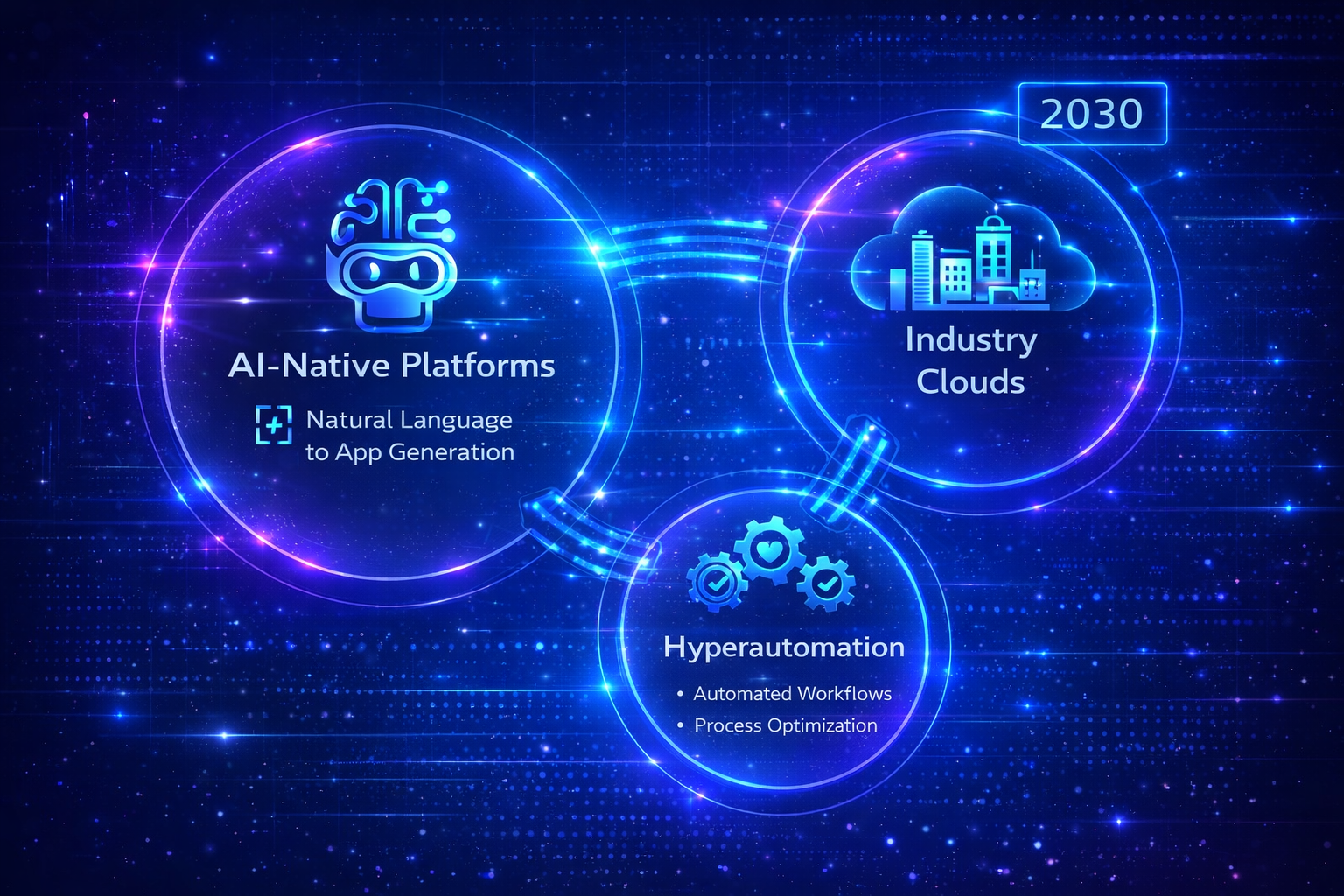
AI-powered development is moving from experimental to mainstream. You can now describe an application in plain English and get a working prototype. AI suggests components based on context, generates code automatically, creates test cases, and identifies security vulnerabilities.
This dramatically lowers technical barriers. Business users who struggled with visual interfaces can now just describe what they want. 'Build me an employee onboarding system that collects personal information, assigns a buddy, schedules orientation, and creates accounts.' The AI handles the details.
Hyperautomation integration combines application development with process mining, RPA, AI/ML, and analytics. Instead of building applications in isolation, platforms now discover automation opportunities, build custom solutions, integrate with legacy systems through RPA, apply AI for intelligent decision-making, and monitor everything through unified dashboards.
This convergence enables end-to-end transformation. You can identify inefficient processes, build applications to improve them, integrate with existing systems, and optimize everything continuously.
Industry-specific solutions are maturing rapidly. Generic platforms are adding industry accelerators with pre-built components, compliance frameworks, integration templates, and best practices. Healthcare platforms include HIPAA compliance and EHR integration. Financial platforms provide fraud detection and regulatory reporting. Manufacturing platforms offer IoT connectivity and supply chain templates.
These solutions cut implementation time by 60-80% because you're customizing proven frameworks rather than building from scratch.
The bottom line: platforms are getting smarter, more integrated, and more specialized. What required coding expertise five years ago is becoming accessible to anyone who can describe what they need.
4. Core Capabilities and Features
Understanding what these platforms actually do matters more than marketing promises. Let's look at real capabilities.
4.1 Visual Development
The core feature is visual development. You drag components onto a canvas instead of writing code:
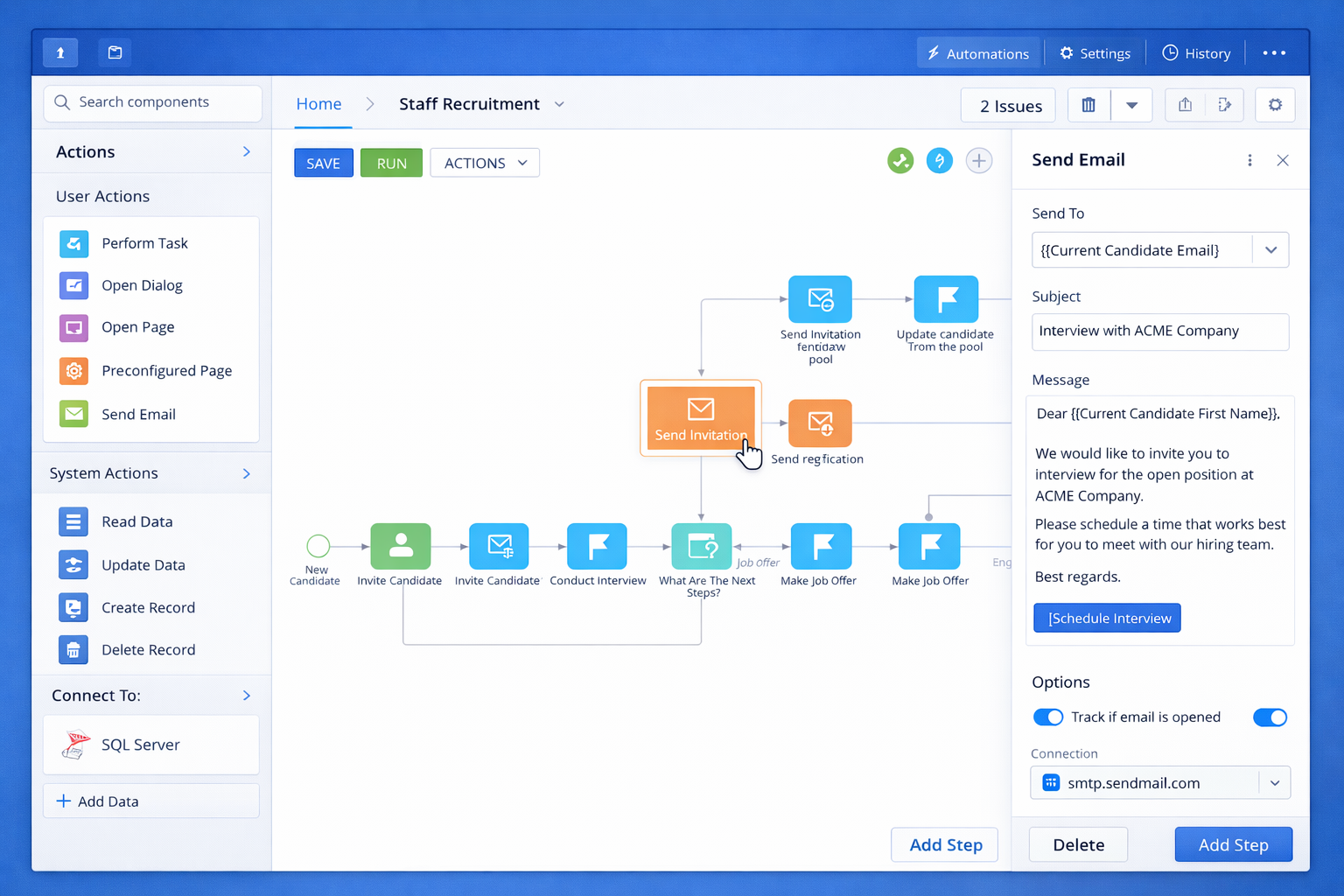
- Interface builders let you create screens by dragging buttons, forms, tables, and charts. The platform handles responsive layouts automatically.
- Workflow designers represent business logic visually. Connect nodes for actions, decisions, loops, and integrations. The platform converts this to executable code.
- Component libraries provide pre-built, tested pieces you assemble into applications. Need a calendar? Drag it in. File upload? Already built. Authentication? Handled.
- Templates accelerate development further. Complete application frameworks for common scenarios reduce work by 60-80%.
This isn't toy technology. Major enterprises build production applications handling millions of users with these tools.
4.2 Data and Integration
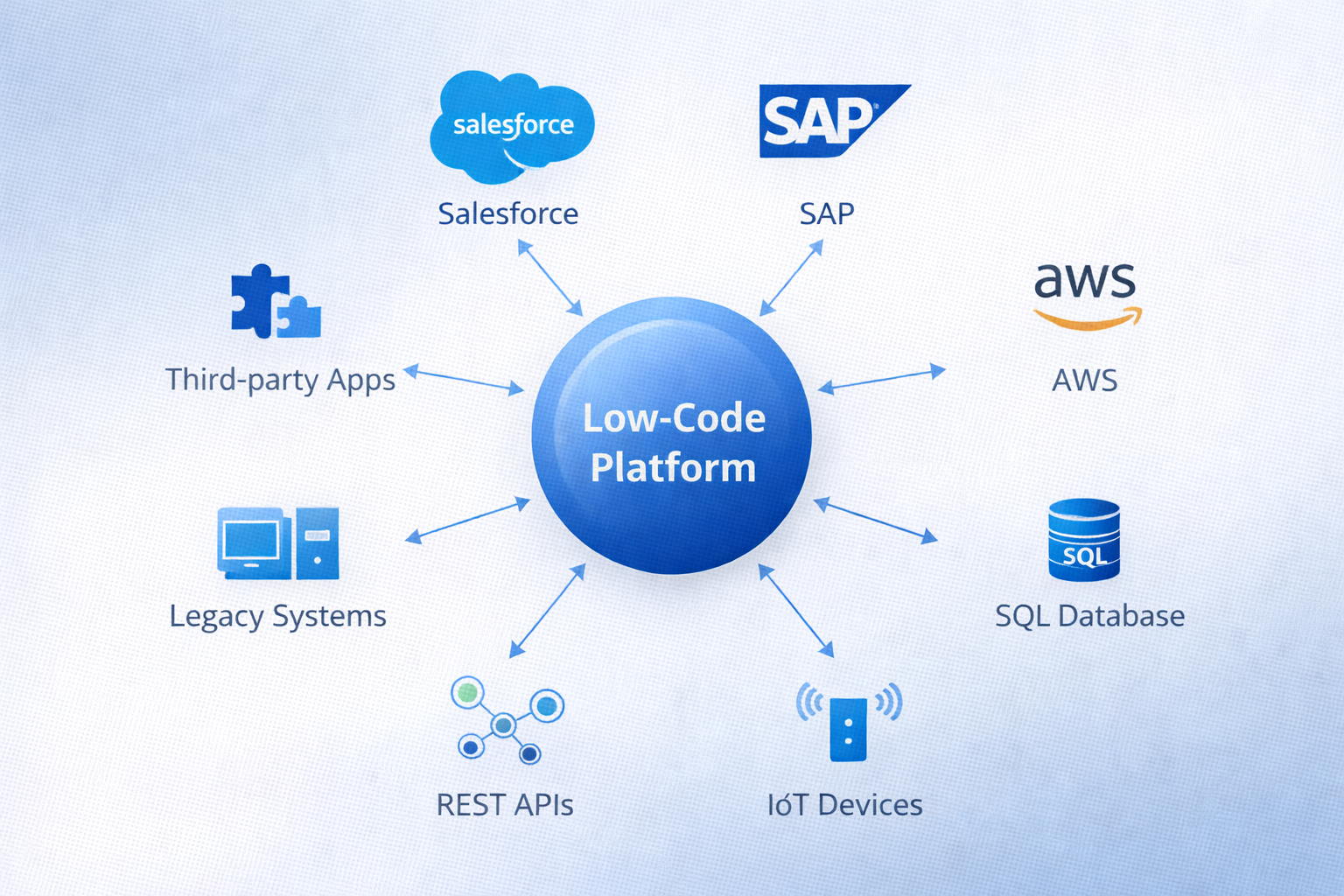
Applications need to connect to databases and other systems. Modern platforms handle this through:
- Universal database connectors support MySQL, PostgreSQL, Oracle, SQL Server, MongoDB, and dozens of others. No database administration expertise required.
- API integration connects to thousands of services through pre-built connectors. Salesforce, SAP, Workday, Stripe, Twilio — they're all available.
- Built-in data modeling lets you design database schemas visually without SQL knowledge. Define entities, relationships, and validation rules through forms.
- Real-time synchronization keeps data current across systems automatically. Change data in one place, it updates everywhere.
4.3 Deployment and Scale
Enterprise platforms need to deploy reliably and scale to demand. Modern platforms provide:
| Capability | What It Means |
|---|---|
| Multi-platform | Build once, deploy to web, iOS, Android, desktop from single codebase |
| Auto-scaling | Resources adjust automatically based on demand — no manual configuration |
| Global CDN | Content served from locations nearest to users for fast load times worldwide |
| Version control | Track changes, branch development, rollback if problems occur |
| Blue-green deployment | Test new versions in production-like environments before cutover |
These capabilities ensure applications built on no-code/low-code platforms can handle enterprise scale. Companies deploy applications serving millions of users globally without managing infrastructure.
5. Business Benefits and Value Proposition
The business case for these platforms comes down to three main benefits: speed, cost savings, and expanded capacity. Let's quantify each.
5.1 Development Speed
Speed improvements are dramatic and measurable:
| Application Type | Traditional Dev | No-Code/Low-Code |
|---|---|---|
| Simple workflow | 2-3 months | 1-2 weeks |
| Customer portal | 4-6 months | 4-6 weeks |
| Complex business app | 9-12 months | 2-3 months |
| Mobile app | 6-8 months | 3-4 weeks |
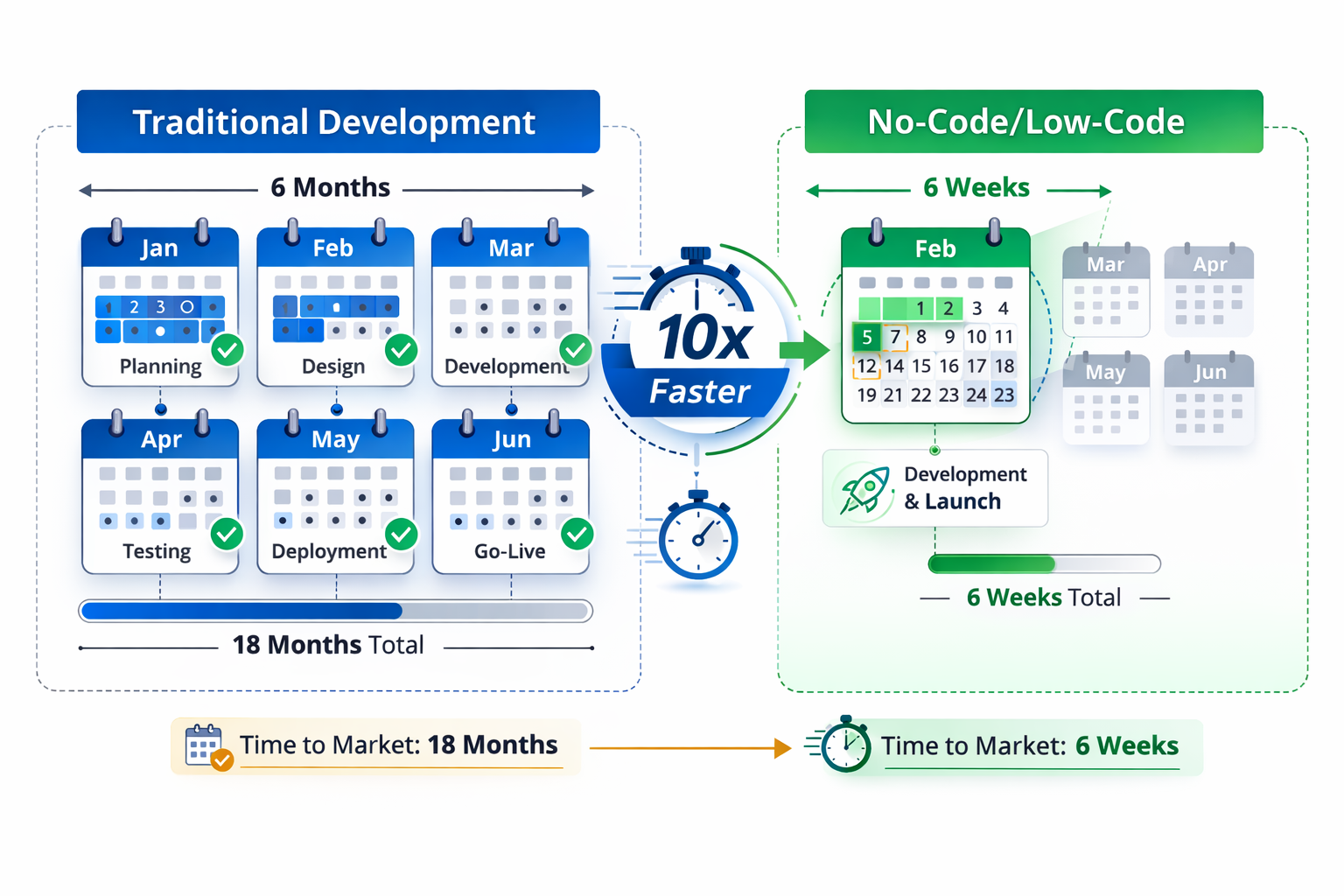
Real example: A Fortune 500 insurance company needed a COVID-19 claims processing application. Traditional development estimate was 8-10 months. Using OutSystems, they delivered a production application in 6 weeks. It processed 50,000 claims in the first month.
The speed comes from multiple factors. Visual development eliminates coding syntax. Pre-built components save 60-80% of custom work. Automatic code generation creates optimized implementations. Integrated testing catches issues earlier. Simplified deployment removes complex configuration.
5.2 Cost Reduction
Cost savings appear across the entire lifecycle:
| Cost Category | Traditional | No-Code/Low-Code |
|---|---|---|
| Development | $500K - $2M | $50K - $300K |
| Annual maintenance | $100K - $400K | $20K - $100K |
| 5-year TCO | $1M - $3.6M | $150K - $700K |
| Savings | Baseline | 70-85% |
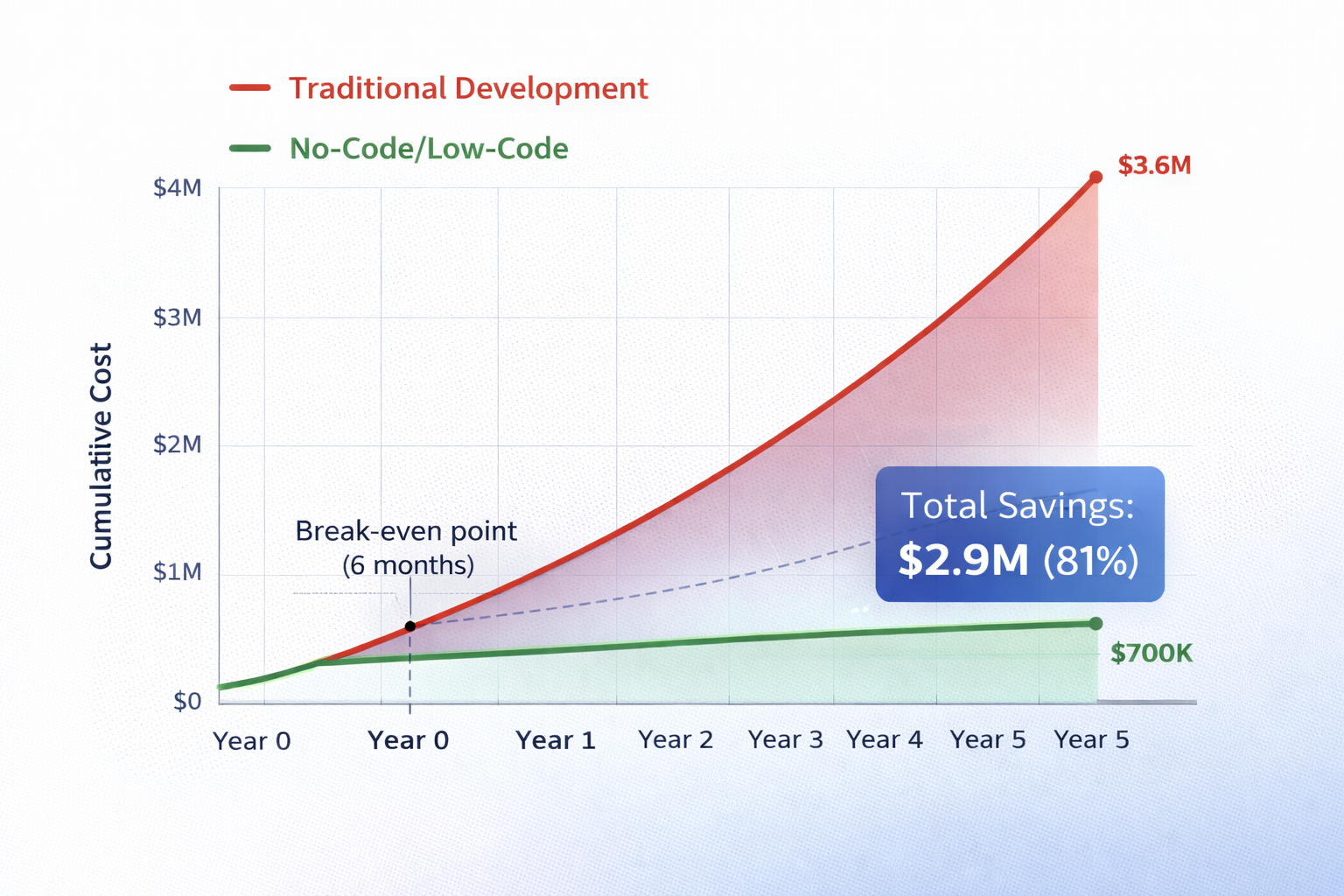
These aren't theoretical numbers. They come from actual project data across hundreds of implementations. The insurance company mentioned earlier saved an estimated $12 million in manual processing costs within the first year.
5.3 Multiplied Capacity
The real transformation is capacity multiplication. When business users can build applications themselves, development capacity increases 3-5x without hiring more programmers.
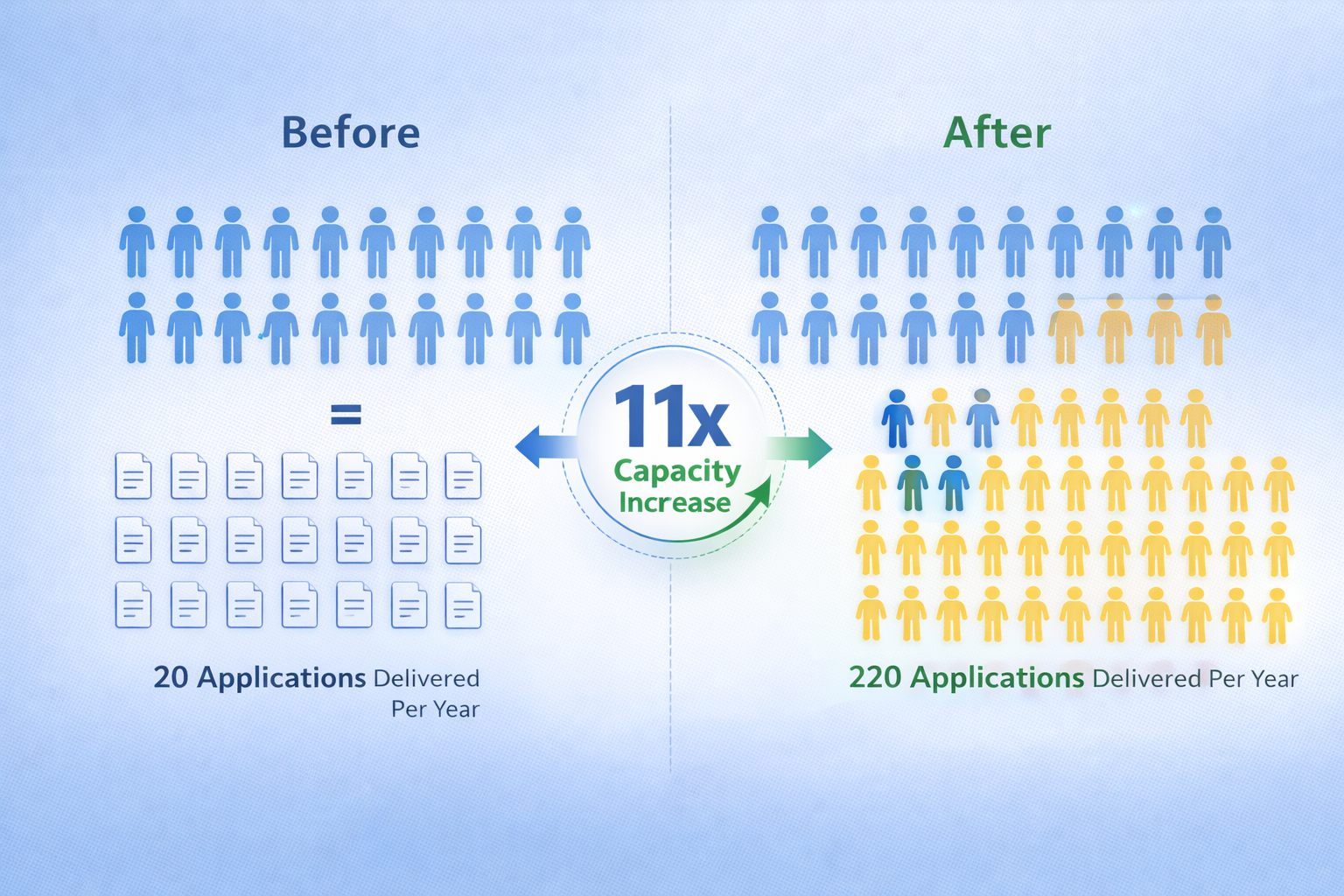
Organizations with active citizen developer programs report:
- 40-60% reduction in IT backlog as business teams build departmental applications themselves
- 3-5x increase in application delivery without adding IT headcount
- Higher business satisfaction because solutions match needs better (built by people who understand the problems)
- IT teams free to focus on complex problems requiring real technical expertise
The math is compelling. If your IT department can deliver 20 applications per year, and you enable 100 business users to each build 2 applications, you've gone from 20 to 220 applications. That's 10x capacity increase without hiring a single developer.
6. Use Cases and Applications
These platforms work well for specific types of applications. Understanding what fits helps target high-value opportunities.
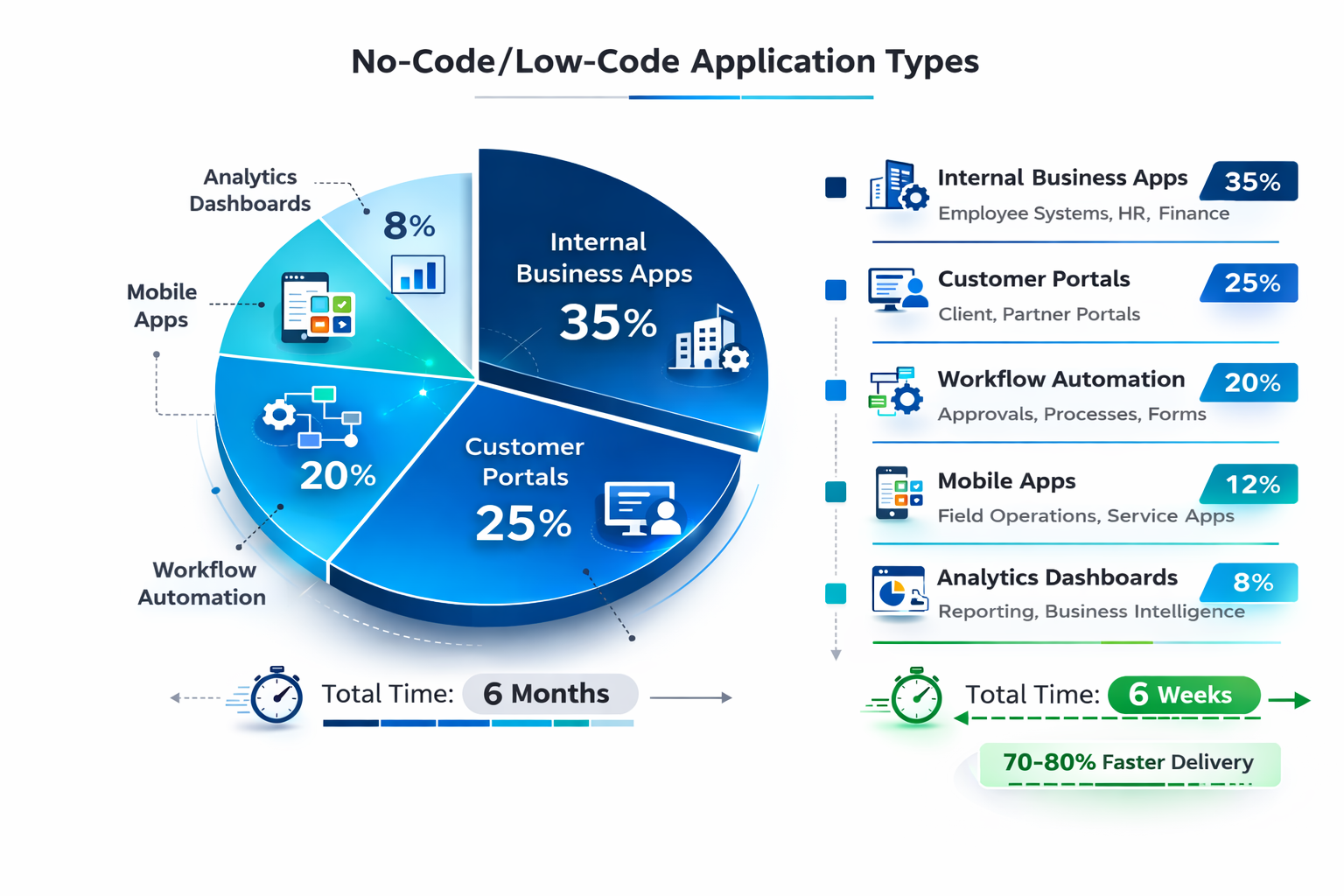
6.1 Internal Business Applications
The sweet spot is internal tools where speed matters more than complexity. Employee onboarding portals that automate paperwork and access provisioning. Expense management systems for submission and approval. Project tracking tools. HR self-service portals. Operations dashboards. Inventory management. Quality tracking systems.
6.2 Customer-Facing Applications
Customer portals for account access and support. Mobile apps for product catalogs and loyalty programs. E-commerce platforms. Self-service configuration and quoting tools. Appointment booking systems. Field service apps for technicians.
6.3 Industry-Specific Solutions
Healthcare: patient portals, telehealth platforms, care coordination. Financial Services: loan origination, compliance reporting, fraud detection. Manufacturing: production scheduling, equipment maintenance, quality inspections. Retail: inventory optimization, store operations, promotion management.
7. Challenges and Limitations
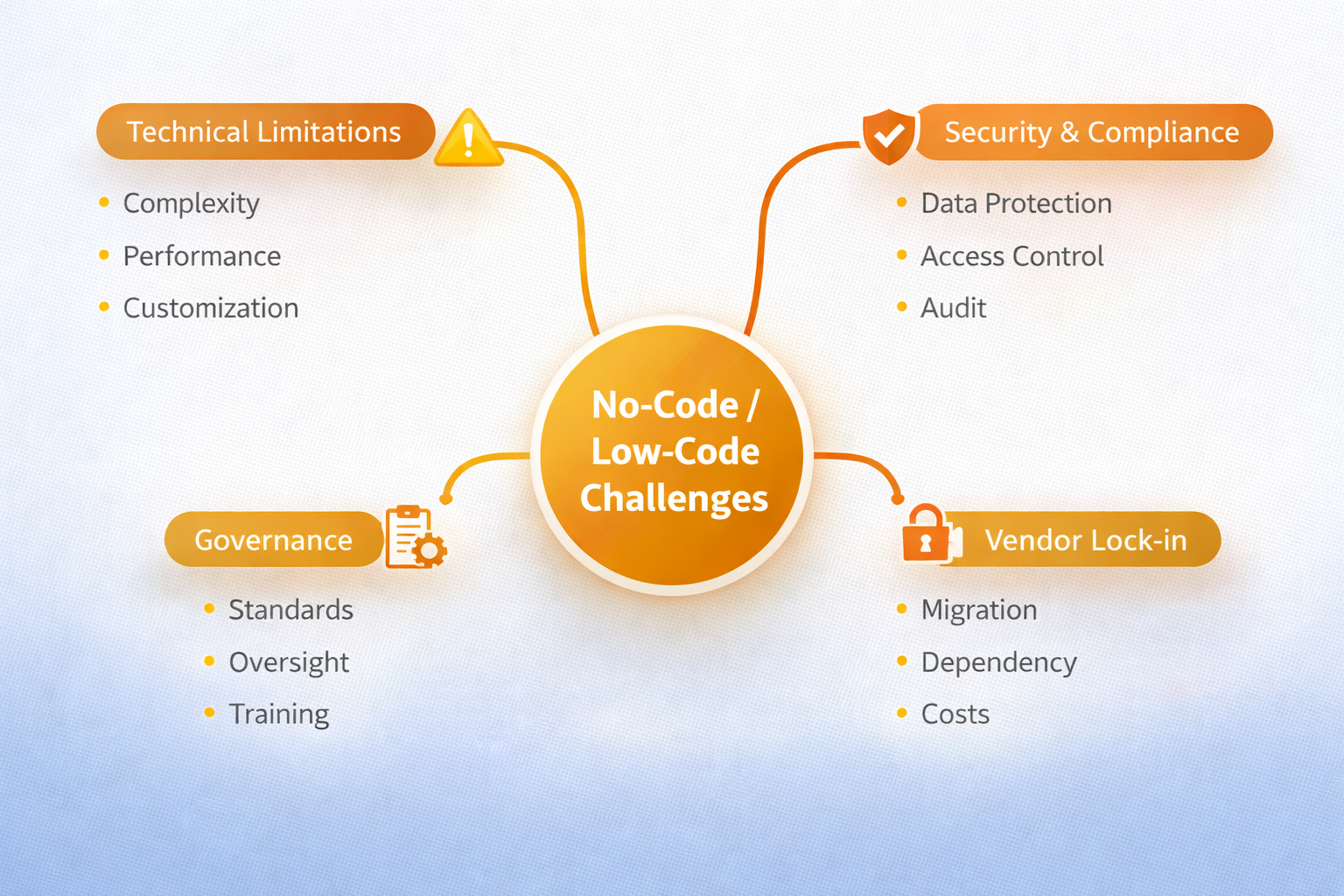
These platforms aren't magic. They have real limitations you need to understand.
7.1 Technical Boundaries
Highly complex algorithms may exceed visual tools. Applications needing extreme performance optimization might require hand-coding. Very specialized requirements without pre-built components need traditional development. Real-time processing with microsecond latency may not fit. Know the boundaries before committing.
7.2 Security and Compliance
Democratized development creates security risks without proper governance. Citizen developers don't know security best practices. Sensitive data can be exposed. Compliance requirements (GDPR, HIPAA) need careful management. Shadow IT proliferates without controls. You must implement security frameworks before wide rollout.
7.3 Vendor Lock-in
Applications built on one platform don't easily migrate to others. Proprietary data models, APIs, and workflows make switching expensive. Plan for this. Evaluate vendor stability. Implement hybrid architectures that limit dependency. Have exit strategies.
8. Governance and Best Practices
Success requires structured governance. You can't just turn people loose with these tools.
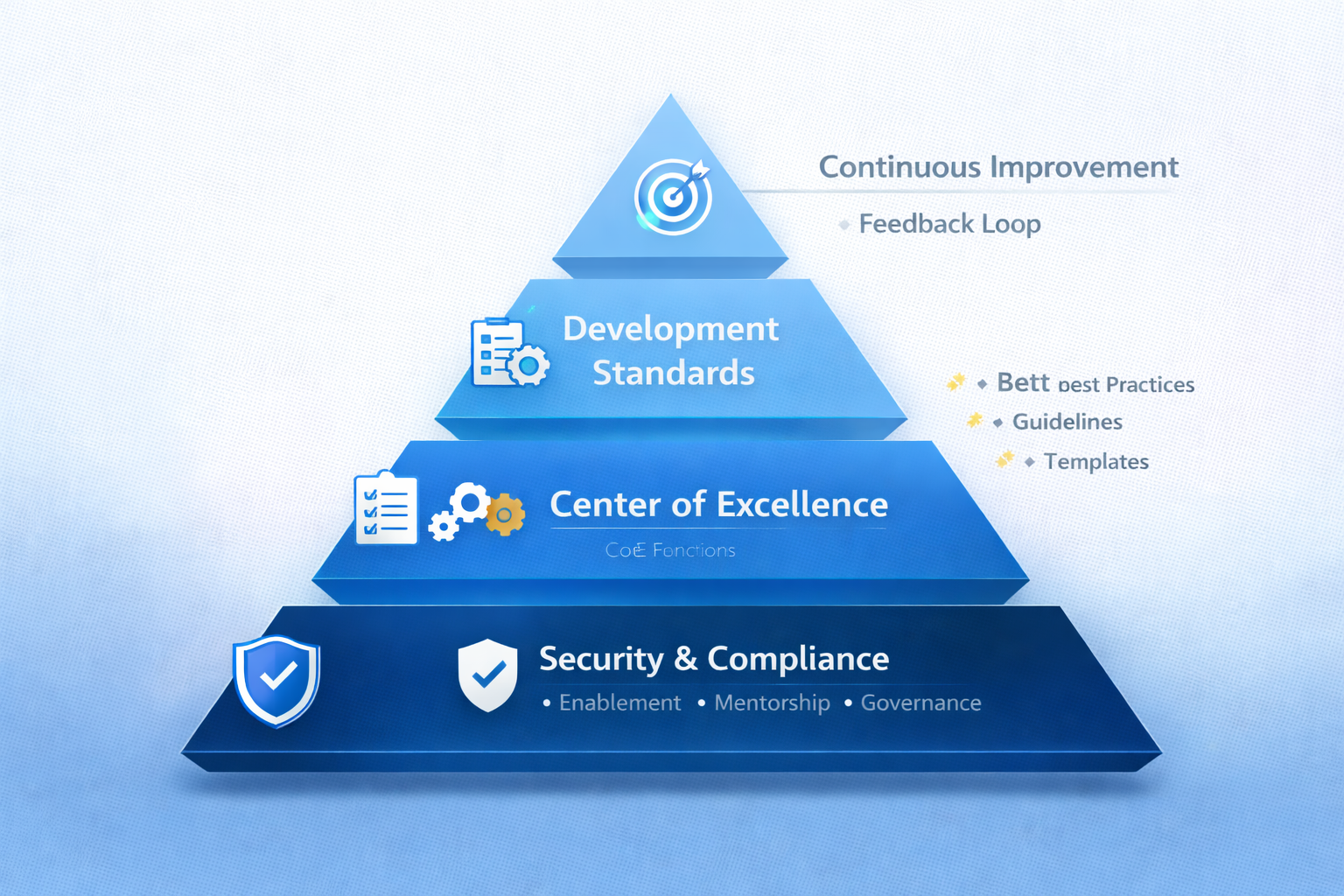
8.1 Center of Excellence
Create a CoE to manage platforms, set standards, provide training, review applications, and share best practices. Staff it with platform architects, business analysts, security specialists, and training coordinators. This seems like overhead but prevents disasters.
8.2 Security Framework
Implement access controls, data classification policies, security training, application review processes, penetration testing, compliance checklists, audit logging, and incident response procedures before wide adoption.
8.3 Development Standards
Define naming conventions, design patterns, code review requirements, testing standards, documentation requirements, performance benchmarks, and change management processes. Balance rigor with pragmatism.
9. Implementation Strategy
How you implement matters as much as what platforms you choose.
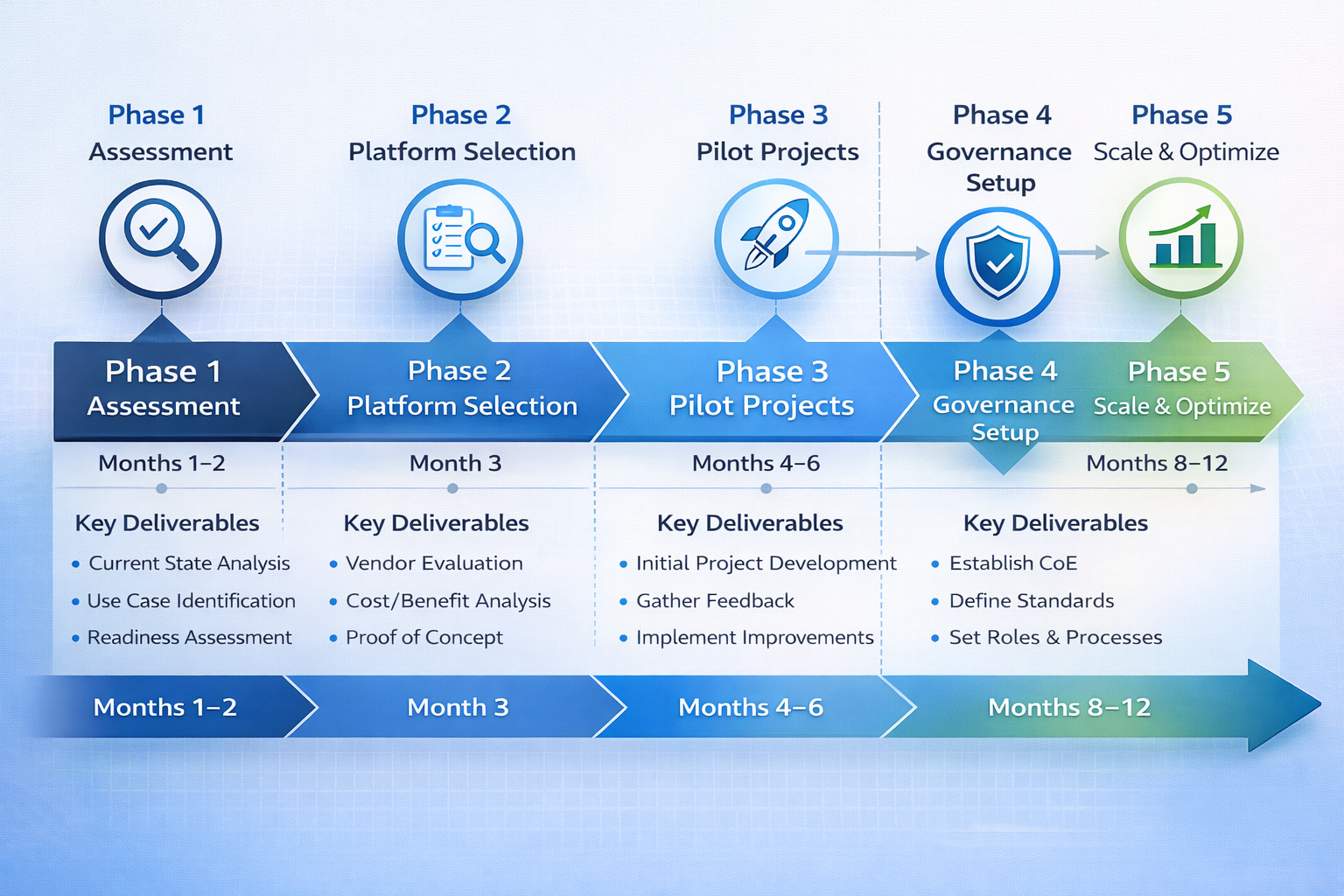
9.1 Assessment and Planning
Assess organizational readiness. Identify high-value use cases. Evaluate platforms against real requirements. Engage stakeholders across business and IT. Don't skip this groundwork.
9.2 Pilot Programs
Start with 2-3 pilots delivering value in 4-8 weeks. Pick projects with clear success criteria, engaged sponsors, manageable scope, and reasonable complexity. Measure rigorously. Use learnings to refine governance and processes. Scale gradually.
9.3 Training and Change Management
Invest in comprehensive training. Build communities of practice. Celebrate successes publicly. Address resistance through transparent communication. This isn't optional.
10. The Future of No-Code/Low-Code
The technology continues evolving rapidly. Three trends will shape the next five years.
10.1 AI Integration
AI-assisted software development will generate applications from natural language descriptions, create tests automatically, optimize performance continuously, and identify bugs before deployment. The technical barriers for low-code automation tools will keep dropping.
10.2 Developer Evolution
Professional developers won't disappear. They'll shift to higher-value work: building platform extensions, creating reusable components, architecting solutions, optimizing performance, and focusing on AI/ML and specialized domains. The role evolves from writing code to enabling others.
10.3 Market Maturity
By 2030, 90% of applications will use some no-code/low-code technology. Citizen developers will outnumber professional developers 5:1. Software development will democratize from specialized craft to general business skill.
11. Conclusion
11.1 Key Takeaways
No-code/low-code platforms deliver measurable business value through faster time-to-market, reduced costs, and expanded development capacity. The market is mature and proven. Major enterprises use these platforms for mission-critical applications.
Success requires balancing democratization with governance. You can't just let everyone build whatever they want. Implement security frameworks, development standards, and oversight mechanisms first.
These platforms work best as part of hybrid strategies. Use them for what they're good at: business applications, workflows, portals, dashboards. Use traditional development for complex algorithms and specialized systems.
11.2 Recommendations
Start with focused pilots. Pick 2-3 high-value projects. Deliver them in 4-8 weeks. Measure results rigorously. Use learnings to refine your approach.
Invest in governance upfront. Create a Center of Excellence. Define standards. Implement security frameworks. Train people properly. This foundation prevents problems as you scale.
Think strategically. This isn't about saving money on a few projects. It's about fundamentally increasing your organization's ability to deliver applications quickly. Early adopters gain competitive advantages through speed, lower costs, and better business-IT alignment.
The question isn't whether to adopt these platforms. It's how to implement them effectively. Organizations that move thoughtfully with proper governance position themselves to thrive. Those that delay risk falling behind competitors who've already multiplied their development capacity.
The no-code/low-code revolution is here. Act now.
References
- Gartner. (2025). Market Guide for Low-Code Development Technologies. Gartner Research.
- Forrester Research. (2024). The Forrester Wave: Low-Code Development Platforms, Q3 2024.
- IDC. (2025). Worldwide Low-Code Software Forecast, 2025-2030.
- McKinsey & Company. (2025). Digital Transformation and Low-Code Platforms.
- U.S. Bureau of Labor Statistics. (2024). Occupational Outlook Handbook: Software Developers.
- Microsoft Corporation. (2025). Power Platform Adoption Report 2025.
- OutSystems. (2024). The State of Application Development 2024: Global Survey Results.
- Salesforce. (2025). Low-Code Development Trends and ROI Analysis.
- Mendix. (2024). Enterprise Low-Code Application Development: Best Practices Guide.
- Deloitte. (2025). Digital Transformation Through Low-Code: Industry Insights.
- Harvard Business Review. (2024). How Low-Code Development Is Transforming IT.
- Accenture. (2024). The Future of Software Development: Low-Code and AI Convergence.
- KPMG. (2024). Low-Code ROI and Business Value Analysis.
- Goldman Sachs. (2024). Software Development Evolution: From Code to No-Code.
- Zapier. (2024). State of Business Automation Report 2024.