
 Back
Back







Key Takeaways
- Diet and nutrition app development typically costs $10,000 to $150,000, depending on whether you're shipping a focused MVP (minimum viable product) or a full AI-personalized platform with wearable sync.
- A nutrition app doesn't need to be HIPAA-covered to carry federal breach-notification obligations. The FTC's amended Health Breach Notification Rule already covers many consumer wellness apps.
- Google Fit's APIs are being retired. Health Connect and the new Google Health API are the 2026 integration targets, not Google Fit.
- AI photo food logging is useful, not infallible. Build in a confirm-or-edit step and a rules engine that overrides risky AI suggestions.
What Is Diet and Nutrition App Development?
Diet and nutrition app development is the process of designing, building, and maintaining software that helps people log food intake, track nutrients, and get personalized dietary guidance. Good implementations add verified food data, wearable device signals, and, increasingly, AI-driven recommendations.
The category splits into six recurring diet and nutrition app development solutions, and knowing which one you’re actually building changes almost every decision that follows:
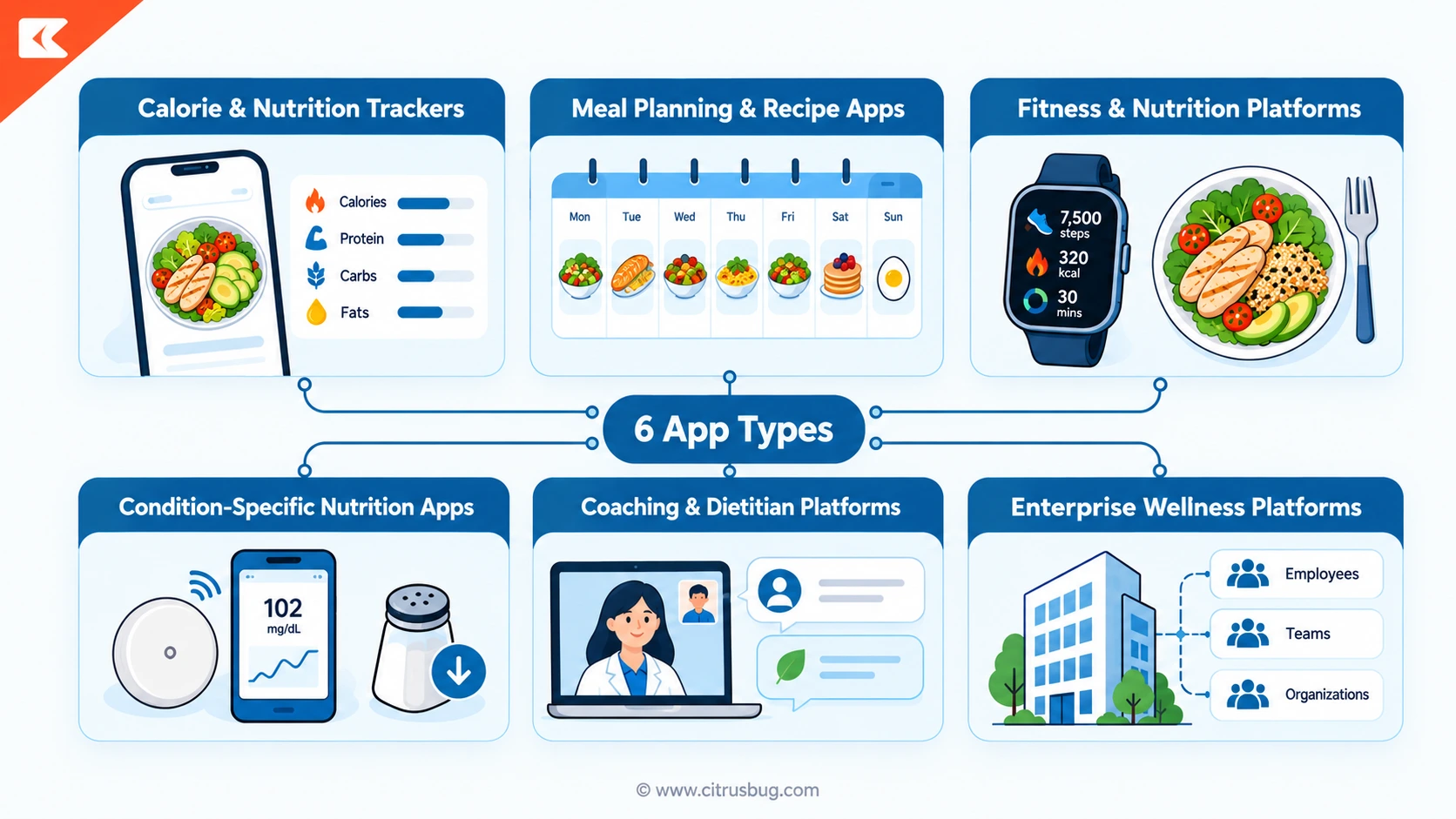
- Calorie and nutrition trackers — barcode scans, search, or photos feed a database that calculates calories, macronutrients, and daily targets.
- Meal planning and recipe apps — turn goals into a weekly meal plan and an auto-generated shopping list.
- Fitness and nutrition platforms — combine food logs with activity and sleep data from a wearable.
- Condition-specific nutrition apps — built around diabetes, hypertension, or allergy management, with tighter data rules and more clinical review.
- Coaching and dietitian platforms — connect a patient or client to a credentialed professional through chat, video, and shared records.
- Enterprise wellness platforms — serve employers, insurers, or health systems, and need multi-tenant architecture and consent tracking from day one.
Most of these sit inside a broader healthcare product strategy, even when the app itself is consumer-facing rather than clinical.
The Diet and Nutrition App Market in 2026
Market sizing for this category varies more than most because different research firms define its boundaries differently. Analyst firm Grand View Research forecasts the global diet and nutrition apps market will grow from $2.1 billion in 2024 to $4.6 billion by 2030, a 13.4% compound annual growth rate (CAGR). North America already holds a 36.4% revenue share of that market, and iOS is the largest platform by share at 52.5%, both as of 2024.
Core Features to Include in a Successful Diet and Nutrition App
Diet and nutrition tracking app development lives or dies on how fast a user can log a meal, so every feature below is judged against that bar.
MVP Must-Haves
- User profiles and targets: age, height, weight, activity level, allergies, and standard basal metabolic rate (BMR) based calorie and macro targets.
- Food logging: barcode scan, search, recent items, and manual entry, all mapped to structured nutrient data.
- Progress dashboards: daily and weekly trends for calories, weight, and hydration.
- Push notifications: logging reminders that respect a user’s own schedule, not blanket blasts.
Advanced and AI Features
- AI photo food logging: a computer vision model estimates food items and portions from a photo, with the user confirming or editing before the entry saves.
- Personalized meal plans: a recommendation engine ranks recipes against goals, allergies, and past logs.
- AI coaching: a large language model (LLM) handles conversational questions about recipe swaps or missing ingredients, with a rules engine blocking unsafe suggestions before they reach the user. This is close to what conversational AI in healthcare looks like technically, just pointed at food and habit questions instead of appointment scheduling.
Citrusbug’s own AI habit-coaching engine built for Noom shows these features working in production. Adaptive recommendations lifted user retention by 28% and habit adherence by 35% across more than 2 million active users, with the backend holding 99.95% platform reliability.
Dietitian and Clinical Features
- Provider dashboards: a dietitian reviews client logs, assigns meal plans, and messages through the app.
- Condition-specific tracking: sodium, potassium, or carbohydrate limits for renal or diabetes programs, feeding into a care team’s workflow.
- Billing and admin tools: subscriptions, family or corporate plans, and content management for non-technical staff.
Best Practices for Diet App UI/UX Design
Food logging happens multiple times a day, so friction in the user interface and user experience (UI/UX) compounds fast. A few rules hold up in practice:
- Log a recurring meal in three taps or fewer.
- Put recent items and favorites ahead of search results, not after them.
- Use barcode and photo scanning as the fast path, search as the fallback.
- Show primary numbers (calories, macros) on the main screen; push detailed micronutrient breakdowns into a secondary view.
- Write copy that states facts without judgment. “600 calories logged” reads differently than “You went over your limit.”
- Make weight display optional. Some users track food without wanting a number on the home screen.
- Support screen readers, adjustable font sizes, and sufficient color contrast from the first release, not as a later pass.
How to Develop a Diet and Nutrition App From Scratch
Developing a diet and nutrition app from scratch follows a fairly consistent sequence, whether you’re a five-person startup or an enterprise wellness team:
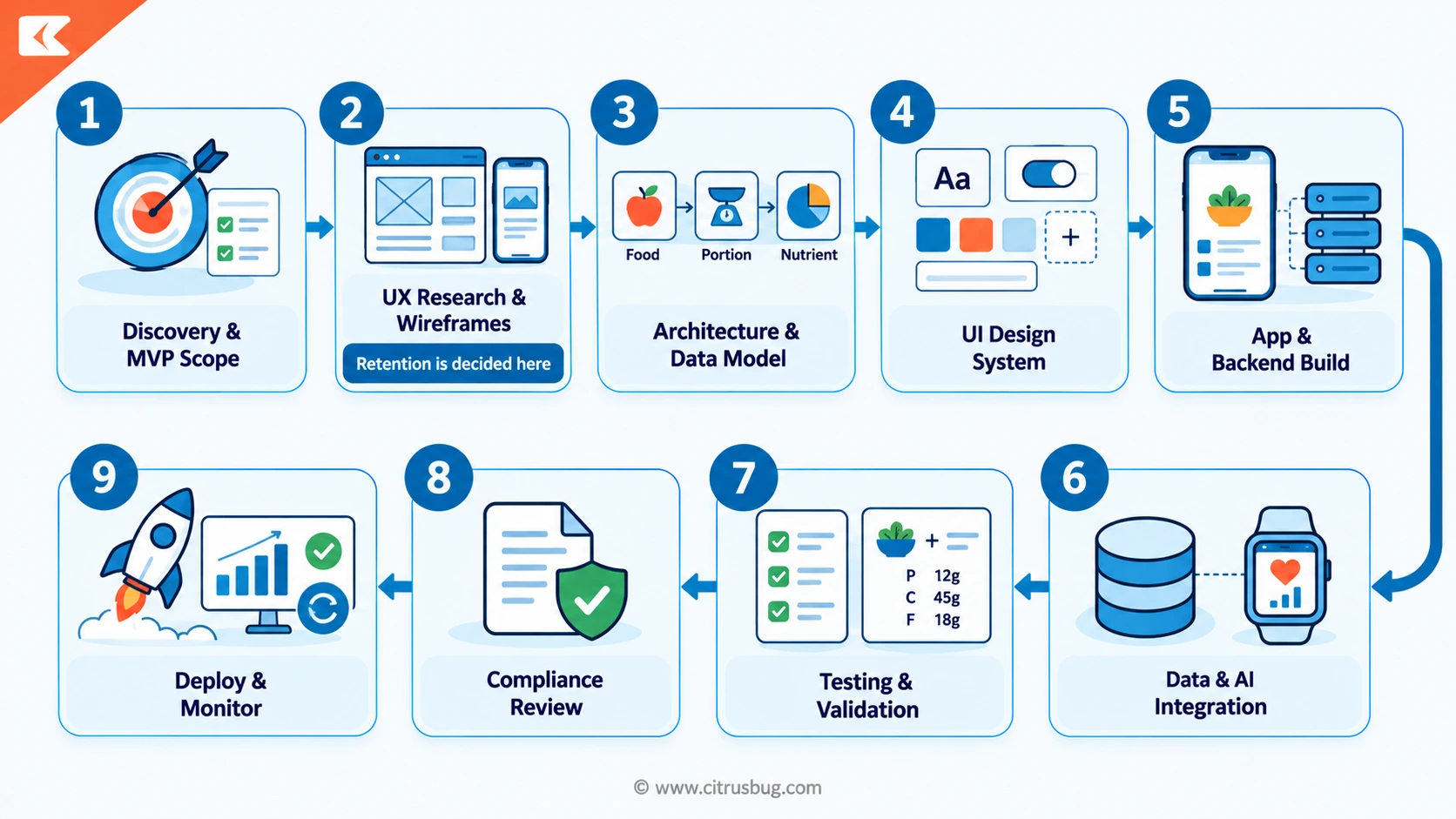
- Scope the discovery phase. Define the app type, target users, and MVP boundary before any design work starts.
- Research and wireframe the user experience. Test the logging flow specifically. This is where most retention problems get designed in or out.
- Model the architecture and data. Map the relationships between food items, portions, nutrients, and user accounts before writing backend code.
- Design the interface. Build a component library, then apply it, rather than styling each screen individually.
- Build the app and backend. Use native code (Swift, Kotlin) or a cross-platform framework (Flutter, React Native) on the client, and Node.js, Python, or Go on the backend.
- Integrate the data and AI models. Connect the food database, wearable application programming interfaces (APIs), and any AI models behind a rules engine that reviews their output.
- Test and validate the system. Check nutrient math, unit conversions, and AI accuracy against a labeled test set, not just for software bugs.
- Review compliance before launch. Confirm privacy policy, consent flows, and account deletion paths before submitting to app stores.
- Deploy and monitor in production. Ship to staging, then production, and track API errors, sync failures, and AI drift after launch, not just crash reports.
Choosing a Food Database and Nutrition API
Your food data source shapes accuracy, licensing cost, and how much manual cleanup your team does later. USDA FoodData Central is the free, U.S. government-maintained option and a reasonable default for a general consumer app, though its coverage of branded and restaurant items is thinner than commercial alternatives. Commercial platforms such as Nutritionix, Edamam, and the FatSecret Platform charge for API access. They cover a much larger set of branded products, restaurant menus, and barcode lookups, which matters if your users eat out often or shop in the US.
Whichever source you pick, plan for a review queue. Crowdsourced and even government databases sometimes contain duplicate, incomplete, or regionally inconsistent entries, so assign someone on your team to own data quality from the start.
How to Integrate Wearable Device Data Into a Diet Coaching Platform
Apple HealthKit and Google Health Connect are the 2026 baseline for wearable integration, and that baseline changed recently. Google stopped accepting new developer signups for the Google Fit APIs on May 1, 2024. The APIs will only be supported until the end of 2026, with Health Connect as the recommended replacement for on-device Android integration. If a competitor’s guide still recommends building against Google Fit, that’s outdated advice.
A second, separate Google migration affects Fitbit integrations on the same 2026 timeline as the Google Fit shutdown above. Google’s own developer documentation states that in September 2026, the legacy Fitbit Web API will be turned down and will no longer sync data to or from Fitbit users. Integrations must move to the new Google Health API and Google OAuth 2.0 before that point.
Health Connect and the Google Health API solve different problems. Health Connect reads on-device Android data, while the Google Health API is the cloud-side replacement for the old Fitbit Web API. Don’t treat them as interchangeable.
Beyond Fitbit, Garmin and Oura both expose their own developer APIs, and continuous glucose monitors (CGMs) such as Dexcom and FreeStyle Libre matter for condition-specific and metabolic-health apps. Many of the same integration lessons apply to general wearable app development, not just nutrition-specific builds.
Whatever combination you connect, normalize the data first. Every vendor uses different units, timestamps, and item identifiers. A healthcare API integration layer that translates all of it into one internal schema keeps a format change on one vendor’s side from breaking your entire sync pipeline.
Tech Stack for Diet and Nutrition App Development
Diet and nutrition mobile tracking app development doesn’t need a generic best-practices stack; it needs one sized to your actual load.
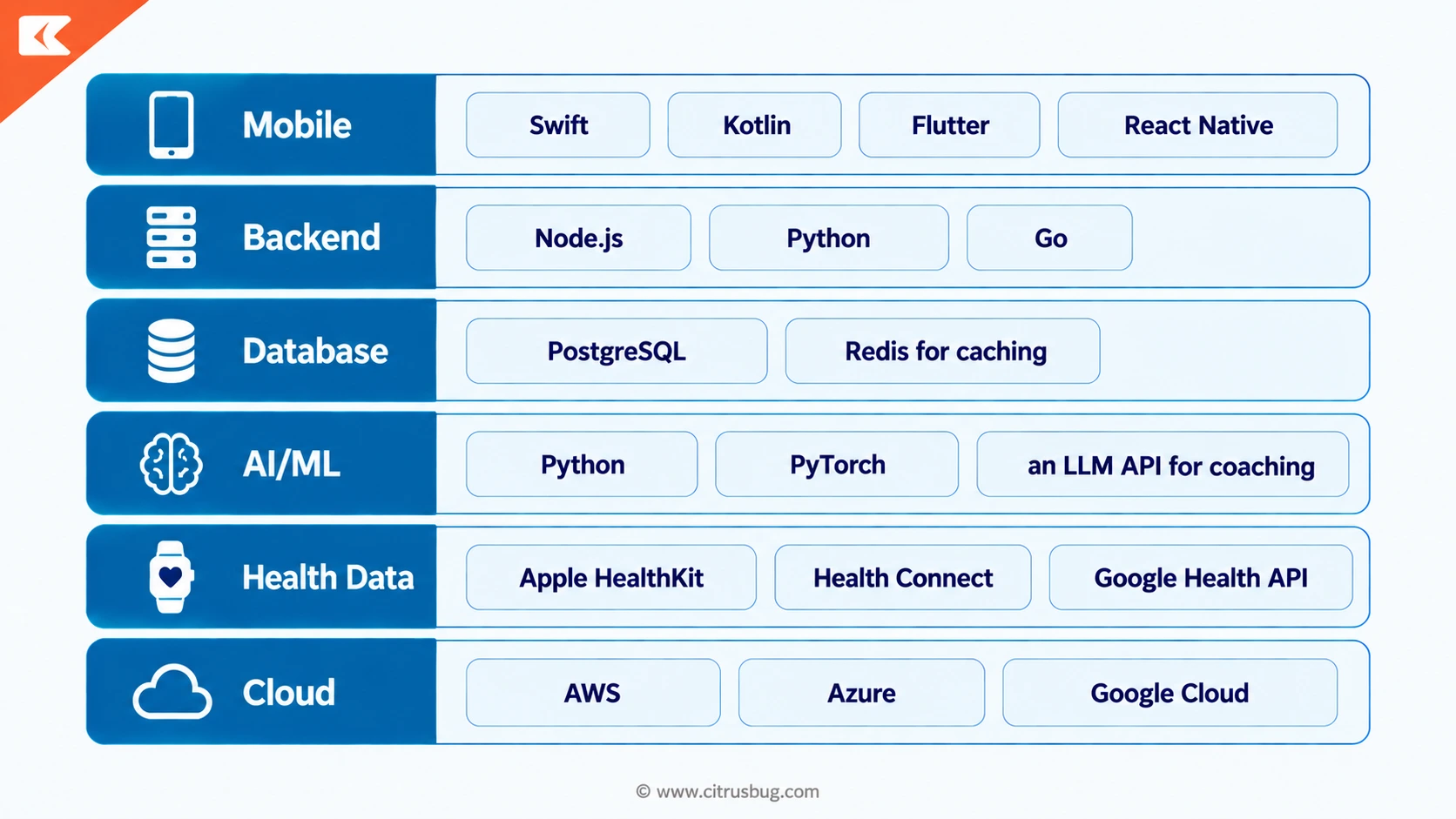
A barcode-only MVP needs a fraction of the infrastructure that continuous AI coaching and wearable sync require. Overbuilding the architecture before you have users is one of the more common ways early budgets get eaten.
Compliance: HIPAA, the FTC Health Breach Notification Rule, GDPR, and FDA
Compliance is the part of diet and nutrition app development that carries the most financial risk if you get it wrong.
The Health Insurance Portability and Accountability Act (HIPAA) applies based on your relationship to a covered entity, not on whether your app mentions health. If you’re building a standalone consumer app with no covered-entity relationship, HIPAA likely doesn’t apply directly, and there’s no such thing as an app being “HIPAA certified.” HIPAA-ready architecture is still worth building if you plan to sell into clinics or health systems later. Our HIPAA-ready application development work typically takes 10 to 24 weeks, depending on how much of the data model needs to support clinical workflows.
The Federal Trade Commission (FTC)’s amended Health Breach Notification Rule became effective July 29, 2024, and it explicitly covers many health and wellness apps that are not HIPAA-covered entities, a detail that is easy to overlook. A diet app that stores weight, a diagnosis, or other identifiable health information can trigger this rule’s breach-notification obligations even without ever touching HIPAA. The current civil penalty is $53,088 per violation, a figure the FTC set in January 2025 and left unchanged for 2026 after a government shutdown disrupted the inflation data the adjustment depends on. If your compliance plan starts and ends with “we’re not a covered entity,” it’s incomplete.
For international products, add General Data Protection Regulation (GDPR) compliance for European Union users. For domestic condition-specific products, consider the California Consumer Privacy Act (CCPA), state laws such as Washington’s My Health My Data Act, and the Food and Drug Administration (FDA)’s general-wellness policy. That policy draws a line between a general wellness app and a regulated Software as a Medical Device.
A diabetes or renal nutrition app that makes treatment claims can cross that line into medical-device territory; a general tracker usually doesn’t. This compliance overview is general guidance, not legal advice. Confirm your specific obligations with counsel before launch, not after.
How Much Does Diet and Nutrition App Development Cost?
Diet and nutrition app development costs $10,000 to $150,000 for most builds. A focused MVP with core logging and one wearable integration sits at the low end; a full AI-personalized platform with a dietitian panel and multiple wearable connections sits at the high end.
Cost estimates for this category range from under $4,000 to over $500,000 across published guides, often within the same publisher’s own site. That range is close to useless on its own, so here’s a tier structure anchored to figures we have actually published and stand behind.
| Tier | What’s Included | Cost | Timeline |
| Focused MVP | Core logging, one wearable integration, basic dashboard | $10,000 to $50,000 | 8 to 20 weeks |
| AI-personalized platform | Photo logging, recommendation engine, LLM coaching | $50,000 to $110,000 | 16 to 28 weeks |
| Full wellness platform | Dietitian panel, multiple wearables, admin tools | $110,000 to $150,000+ | 20 to 36 weeks |
A comparable lifestyle app development build that bundles nutrition alongside sleep and habit tracking runs $15,000 for a core-tracking MVP to $90,000 or more for a full build.
As Ishan Vyas, Co-Founder and CEO of Citrusbug Technolabs, said in a June 2026 announcement about the company’s healthcare-app cost calculator: “Our AI-powered calculator to estimate the cost of healthcare app development is an extension of our mission to simplify digital healthcare innovation.”
Personalization adds a recurring cost line most first-time budgets miss: AI inference. A recommendation engine and LLM-based coaching layer both cost money every time a user asks a question or gets a suggestion, not just once at build time. Food-API licensing (for commercial databases), cloud hosting, and ongoing maintenance typically add another 15% to 20% of the initial build cost per year.
The commercial upside is real if retention holds. According to app-analytics firm Sensor Tower, health and fitness app in-app-purchase revenue reached $385 million in January 2025 alone, up 10% year over year. Global downloads across iOS and Google Play reached 3.6 billion for 2024, up 6% year over year, per the same report.
How Long Does It Take to Build a Nutrition App?
A focused MVP typically ships in 8 to 20 weeks. A full AI-personalized platform with multiple wearable integrations and a dietitian panel takes 20 to 36 weeks, based on the range we see across our own wellness app builds.
Scope creep, not technical difficulty, is what usually pushes a project past its original estimate. Locking the MVP feature list before design work starts is the single most effective way to protect a timeline.
How Diet and Nutrition Apps Make Money
- Freemium: free logging, paid detailed reports or AI features.
- Subscriptions: monthly or annual fees for coaching, meal plans, or advanced tracking.
- Coaching packages: bundled dietitian sessions and custom plans.
- B2B and employer licensing: selling the platform to corporate wellness programs or insurers.
- Marketplace commissions: a cut of dietitian sessions or meal-kit sales booked through the app.
How to Choose a Diet and Nutrition App Development Company
Before comparing vendors, decide whether you actually need custom diet and nutrition app development at all. A dietitian launching their first branded client app might start with a white-label platform. A startup building a differentiated AI meal-planning product, or a clinical program with Fast Healthcare Interoperability Resources (FHIR) and electronic health record (EHR) requirements, usually needs a custom build from day one. No-code tools can validate a very simple concept but rarely survive contact with wearable integrations or a real food database.
If you’re hiring a development partner, check for:
- Healthcare compliance experience, not just a mention of HIPAA on the site.
- Depth with wearable software development kits (SDKs) such as HealthKit, Health Connect, Fitbit, Garmin, and Oura, not just claimed integration.
- Experience with food-database licensing and cleanup, not only generic mobile development.
- Clear IP ownership terms in the contract.
- A defined post-launch support and monitoring plan, since an AI model needs retraining as user behavior shifts.
Lessons from the Best Diet and Nutrition Apps
| App | Standout Feature | Lesson for Builders |
| MyFitnessPal | Massive food database, owned by Francisco Partners since 2020 | Database breadth is a moat, and an expensive one to build |
| Cronometer | Deep micronutrient accuracy | Precision wins a specific, less crowded segment |
| Lose It! | Fast, low-friction logging | Speed of entry drives daily habit formation |
| MacroFactor | Adaptive macro algorithms | Personalization can be algorithmic, not just AI-branded |
| YAZIO | Fasting timers plus meal planning | Bundling adjacent habits extends session frequency |
Noom’s move into GLP-1 medication support in 2026 is worth watching closely. It signals that pure behavior-change coaching is being repositioned around a medication category the entire industry is adjusting to. Any new entrant benchmarking against Noom today needs to account for that shift, not the platform’s older feature set.
Common Pitfalls and How to Avoid Them
Retention drops fast. Users stop logging within weeks when it feels like a chore. Fix this with fast logging paths and streaks, not more notifications.
AI recommendations aren’t always safe. A 2025 randomized trial published in JMIR mHealth and uHealth found that AI photo-based logging correctly identified 86% of dishes versus 68% for voice-based logging. That trial covered only 42 young adults logging 17 known test dishes, not a general population. Treat any AI food-recognition accuracy figure, including that one, as a floor to design around, not a guarantee. Always let users confirm or edit an AI-detected entry before it saves.
Eating-disorder risk gets ignored. Nutrition apps sit close to disordered eating territory. Set minimum-calorie floors on AI-generated plans, avoid shaming language, and make weight display optional. Where a user’s questions suggest something beyond nutrition guidance, route them to a human professional rather than letting an AI chatbot keep responding.
Food data goes stale silently. Vendor catalogs change pricing, schemas, and coverage without warning. Put every external data source behind an integration layer you control, so a vendor’s change doesn’t propagate straight into your production app.
Conclusion
Diet and nutrition app development rewards teams that get the unglamorous parts right: clean food data, wearable integrations that don’t break with every vendor update, and compliance that goes beyond a HIPAA checkbox. If you’re scoping a build, our wellness app development team can walk through your specific requirements and a realistic cost range before you commit to a spec.
A note on how fast this changes. AI products, wearable APIs, and health-privacy rules shift quickly, sometimes within months. The platform, pricing, and regulatory details in this guide were last verified on September 24, 2026.
Frequently Asked Questions
How much does it cost to develop a diet and nutrition app?
Most builds run $10,000 to $150,000. A focused MVP with one wearable integration lands at the low end; a full AI-personalized platform with a dietitian panel and multiple wearable connections lands at the high end.
Does a nutrition app need to be HIPAA compliant?
It depends on whether you have a covered-entity relationship. Even without one, the FTC’s amended Health Breach Notification Rule, effective since July 2024, covers many non-HIPAA wellness apps that handle identifiable health data.
How long does it take to build a nutrition app?
A focused MVP typically ships in 8 to 20 weeks. A full AI-personalized platform with multiple wearable integrations usually takes 20 to 36 weeks.
Which food database should I use?
USDA FoodData Central is free and a reasonable default for general use. Commercial platforms like Nutritionix or Edamam cost more but cover branded and restaurant items more completely.
How accurate is AI photo food logging?
It’s useful but not exact. One 2025 clinical trial found 86% dish-identification accuracy in a small, specific test group, so production apps should always let users confirm or edit an AI-suggested entry.